

A gaming podcast is one of the friendliest ways to build an audience, because it rewards personality and conversation more than twitch reflexes or expensive editing. If you love talking about games, patches, the local scene and the occasional hot take, this format is for you. This guide covers format, gear basics, publishing and growth without the myths that scare beginners off.
Decide on a Format First
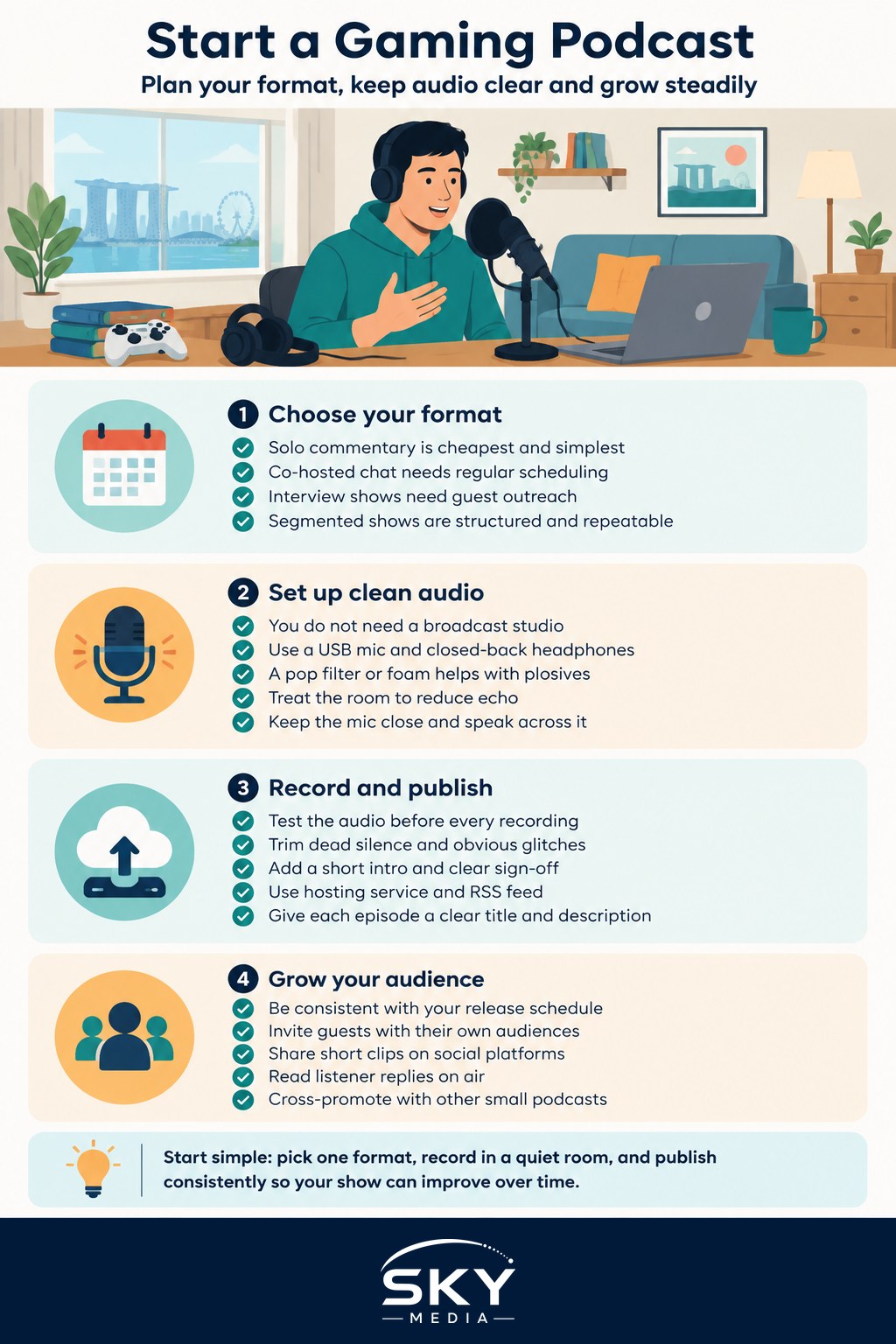
Before you buy anything, decide what your show actually is. Format shapes everything else, from how long episodes run to whether you need guests. Common gaming podcast formats include:
- Solo commentary. Just you, sharing opinions and news. Cheapest and simplest, but leans hard on your energy.
- Co-hosted chat. Two or three regulars bouncing off each other. Natural banter, easier to fill time, needs scheduling.
- Interview show. You host guests from the scene: players, casters, developers. Great for reach, more prep and outreach.
- Segmented magazine. News, then a topic, then recommendations. Structured and repeatable, needs planning.
Pick one you can sustain weekly or fortnightly. A co-hosted chat is a popular starting point because a good conversation partner keeps momentum going on days your own energy is low.
Gear Basics Without the Hype
You do not need a broadcast studio. You need clear, listenable audio and a quiet room. Listeners forgive a plain setup, but they switch off from harsh, echoey or crackly sound.
The realistic starter kit is a decent USB microphone, a pair of closed-back headphones so you can hear problems as they happen, and recording software. A pop filter or foam windscreen helps with harsh “p” sounds and is cheap.
Two free upgrades matter more than any purchase. First, treat your room: record in a space with soft furnishings, curtains or even a wardrobe of clothes to soak up echo. A bare tiled room sounds terrible no matter the mic. Second, get the mic close, roughly a hand span from your mouth, and speak across it rather than straight into it.
Compare Podcast Recording Setups
| Setup | Cost | Audio quality | Best for |
|---|---|---|---|
| Phone or laptop mic | Free | Basic, often echoey | Testing an idea only |
| Single USB microphone | Low | Clear and solid | Solo or one-room hosts |
| USB mic each, remote call | Low to medium | Good if each records locally | Co-hosts in different homes |
| Audio interface and XLR mics | Higher | Best, most control | Committed, growing shows |
For remote co-hosts, the trick is to have each person record their own microphone locally, then combine the tracks later. That way a laggy internet call does not ruin the final audio.
Recording and Editing Cleanly
Record a short test every single time and listen back before the real take. Thirty seconds of checking saves a wasted hour. Watch your levels so no one is too quiet or clipping into distortion.
When editing, keep it light at first. Trim the dead silence at the start and end, cut long rambles and remove any painful audio glitches. You do not need to strip every “um”. A little natural imperfection sounds human and is far better than an over-edited show you never finish. Add a short, consistent intro and a clear sign-off so episodes feel like a series.
Publishing Your Episodes
Podcasts reach listeners through a hosting service that generates an RSS feed. You upload your episode to the host, and that feed carries it out to the major listening apps. You submit your feed to each directory once, and after that new episodes appear automatically.
Give every episode a clear title and a short description with a few relevant terms, since people do search within podcast apps. Consistent cover art ties your brand together, and a regular release day trains listeners to expect you. Many gaming creators also post the audio as a video or chop highlight clips for social platforms, since one recording can feed several formats.
Growing a Loyal Audience
Podcast growth is slower and steadier than viral video, and that is fine, because podcast fans tend to be deeply loyal. Help yours find you:
- Be consistent. A dependable schedule matters more than perfect episodes.
- Invite guests with their own audiences, and share their episode widely.
- Pull thirty to sixty second clips for social feeds to tease new listeners.
- Ask listeners a question and read their replies on air, so they feel part of it.
- Cross-promote with other small local podcasts rather than seeing them as rivals.
Do not obsess over download numbers early on. A small, engaged audience who message you and turn up every week is worth far more than a big number that never interacts.
Planning Episodes Without Overthinking
A little structure keeps episodes from wandering. Before you record, jot a rough running order: an opening chat, two or three topics, and a closing recommendation or question. You do not need a script, and reading one usually sounds stiff. Bullet points are enough to keep the conversation moving without killing the natural flow.
Keep a running list of topic ideas the same way video creators keep an idea bank. New patches, tournament results, a game you cannot stop playing, a listener question: drop them in a note as they occur to you, so recording day never starts from a blank page. When an episode runs short, a saved question or hot take fills the gap without any panic.
Just Start Talking
The biggest barrier to a gaming podcast is not gear or skill, it is pressing record on episode one. Your first few episodes will be rough, and that is true for everyone. Choose a format you enjoy, get clean audio in a quiet room, publish on a rhythm you can keep, and let the show improve as you go. The scene always has room for another honest voice talking about the games we love.
Explore more: Gaming content creation and streaming · How to grow a gaming channel in Singapore · Avoiding burnout as a gaming creator
Frequently Asked Questions
How long should a gaming podcast episode be? The article does not set a fixed length, and none is required. Your format shapes it: a solo commentary, a co-hosted chat or an interview each runs differently. Pick a length you can fill with good conversation and sustain weekly or fortnightly, rather than padding to hit a number.
Can I record a podcast with a co-host who lives elsewhere? Yes. Have each person record their own microphone locally, then combine the tracks afterwards. That way a laggy internet call does not ruin the final audio, because the call is only for conversation and the recorded files stay clean.
How do my episodes get onto Spotify and other listening apps? You upload each episode to a podcast hosting service, which generates an RSS feed. Submit that feed to each directory once, and new episodes then appear in the major listening apps automatically. Use a clear title and short description, since people search within podcast apps.
Do I need to script my podcast episodes? No. Reading a script usually sounds stiff. A rough running order is enough: an opening chat, two or three topics and a closing recommendation or question. Keep a list of topic ideas so recording day never starts from a blank page.
How do I get my first listeners? Be consistent first. Invite guests with their own audiences, post short clips on social feeds, and cross-promote with other small local podcasts. Read listener replies on air so they feel part of the show, and do not obsess over download numbers early on.