
New to Singapore and wondering where to print documents? You are not alone. Plenty of residents do not own a printer, especially in smaller flats and rented rooms, and most of the time they do not need one. But every so often you will need a hard copy of a tenancy agreement, a form, a boarding pass, a resume or a school document.
The good news is that public printing is easy to find. This guide covers the main options for anyone without a printer at home: public libraries, neighbourhood print shops, campus facilities and self-service kiosks, plus what affects the cost and how to keep personal documents safe.
First, Check Whether You Need to Print at All
Singapore runs many services digitally, so it is worth checking before you head out.
- Government services often use Singpass, the national digital identity, and accept online submissions and digital documents. Many agencies no longer need a printed form.
- Tenancy agreements and contracts are increasingly signed electronically.
- Boarding passes and event tickets are usually accepted on your phone.
- Some employers and schools accept scanned or emailed documents.
If the organisation explicitly asks for a physical copy, a wet-ink signature or a certified true copy, then printing is needed. For certified copies, ask the requesting organisation exactly what format they accept.
Option 1: Public Libraries
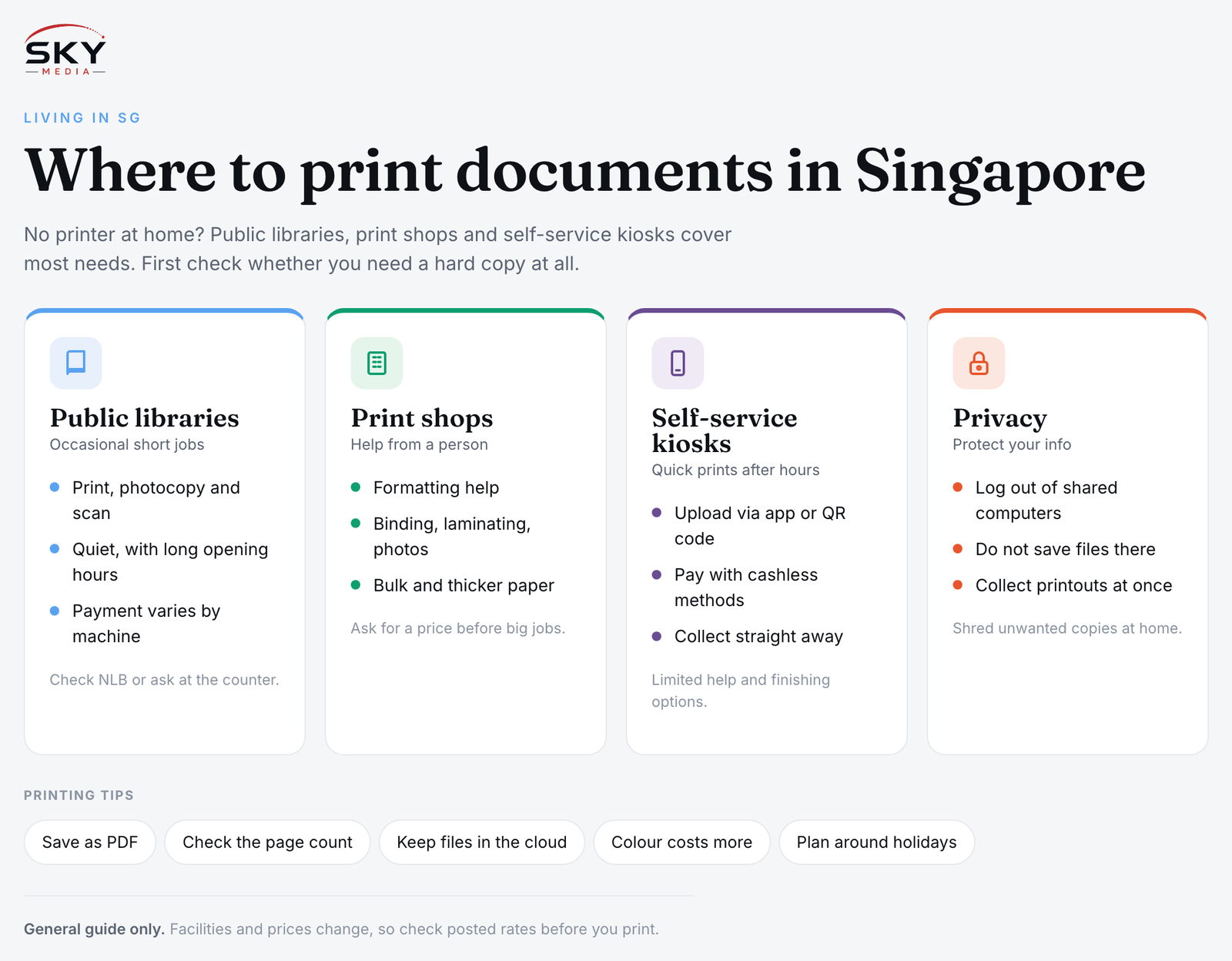
The National Library Board (NLB) runs public libraries across the island, and many branches have printing and photocopying facilities. These are a good choice if a library is near your home or office, and libraries are generally quiet, air-conditioned and open long hours.
How it typically works:
- Library computers may be available for you to access your files, or you can send documents from your own device, depending on the branch’s setup.
- Machines may support black-and-white and colour printing, plus photocopying and scanning.
- Payment methods vary by machine. Some accept stored-value cards, others take cashless payments. Check the instructions at the machine or ask library staff.
Facilities, payment methods and charges differ between branches and change over time, so check the NLB website or ask at the counter before you rely on a particular library. If you enjoy visiting, our list of beautiful public libraries in Singapore makes the trip worthwhile.
Option 2: Neighbourhood and Mall Print Shops
Small print and photocopy shops are common in HDB neighbourhood centres, older shopping centres, and near schools, universities and office districts. Many have been around for decades and handle everything from single pages to bound reports.
Print shops are the best option when you need:
- Help from a person. Staff can sort out formatting, paper sizes or file problems.
- Extra services. Binding, laminating, scanning to email, passport and ID photos, name cards and large-format posters are common.
- Bulk or specialised printing. Thicker paper, double-sided printing, or many copies at once.
Usually you send your file by email or messaging app, bring it on a USB drive, or let staff download it. Prices are charged per page or per job and are usually displayed at the counter. Ask for a price before printing a large job.
Option 3: Self-Service Print Kiosks
Self-service print kiosks are increasingly found in MRT stations, malls, convenience areas and community spaces. They are useful for quick jobs outside office hours.
Typical steps:
- Upload your document through the kiosk operator’s website or app, or scan a QR code at the machine.
- Choose settings such as colour, number of copies and single or double-sided.
- Pay with a cashless method supported by that kiosk.
- Collect your printout immediately.
Kiosks are convenient, but they offer little help if something goes wrong, and paper sizes and finishing options are limited. Check the operator’s app for locations near you.
Option 4: Campus, Office and Community Facilities
- Universities, polytechnics and ITE campuses usually have print facilities for students, often charged to a student account.
- Your workplace may allow occasional personal printing. Ask first rather than assume.
- Co-working spaces usually include printing in membership plans or charge per page.
- Community clubs sometimes offer basic services, though this varies widely.
Comparing Your Options
| Option | Best for | What to expect |
|---|---|---|
| Public library | Occasional short documents near home | Self-service, payment methods vary by machine, quiet and long opening hours |
| Neighbourhood print shop | Formatting help, binding, photos, bulk jobs | Staffed counter, wide services, prices posted at the shop |
| Self-service kiosk | Quick prints outside office hours | Upload via app or QR, cashless payment, limited options |
| Campus or office | Students and staff | Charged to an account or allowed under workplace policy |
What Affects the Cost
Printing costs in Singapore are usually modest for a few pages, but they add up for long or colour documents. The main factors are:
- Black and white versus colour. Colour costs noticeably more per page.
- Paper size and type. A4 is standard. A3, photo paper and card stock cost more.
- Single or double-sided. Double-sided saves paper and often money.
- Extra services. Binding, laminating and scanning are usually charged separately.
- Minimum charges. Some shops and kiosks have a minimum per job.
Because rates vary between providers and change over time, check the posted prices before you print, especially for large jobs.
Protect Your Personal Information
Many of the documents people print, such as passports, NRIC or work pass copies, payslips and bank statements, contain sensitive information.
- Avoid logging into personal accounts on shared computers where possible. If you must, log out fully and close the browser.
- Do not save files to public computers. Delete downloads and empty the recycle bin if you used one.
- Remove your USB drive and check that nothing is left on the printer tray.
- Collect printouts immediately, especially at shared machines.
- Mask sensitive numbers if the receiving organisation allows it.
- Shred unwanted copies at home rather than throwing them in a public bin.
Tips to Make Printing Easier
- Save as PDF first. PDFs keep their formatting on any machine, unlike word processor files.
- Check the page count before sending, so a 2-page document does not become 12 pages because of stray formatting.
- Keep files on your phone and in cloud storage, so you can print from wherever is closest.
- Ask about passport photos at print shops, as many offer them while you wait. Check the photo requirements of the agency that asked for it.
- Plan around public holidays, when some shops close.
If you find yourself printing every week, it may be time to consider a small home printer. For occasional needs, the library, a neighbourhood print shop or a kiosk will usually do the job. If you prefer handling forms at a machine, our guide to SAM kiosks and services covers another type of self-service terminal you may come across.