
Most Singapore drivers buy a dash cam to record what happens on the road. Yet some of the most frustrating incidents happen when nobody is in the car: a door ding in a tight HDB carpark, a scrape from a reversing van, or a hit-and-run at a shopping mall. That is where dash cam parking mode comes in, and it is one of the features that varies most between models.
This guide goes deep into that single buying factor. If you need the basics of dash cams first, start with dash cameras explained for drivers. Here, we focus on how parking recording works, how it is powered, and how to compare the options so you buy what suits the way you park.
What Parking Mode Actually Does
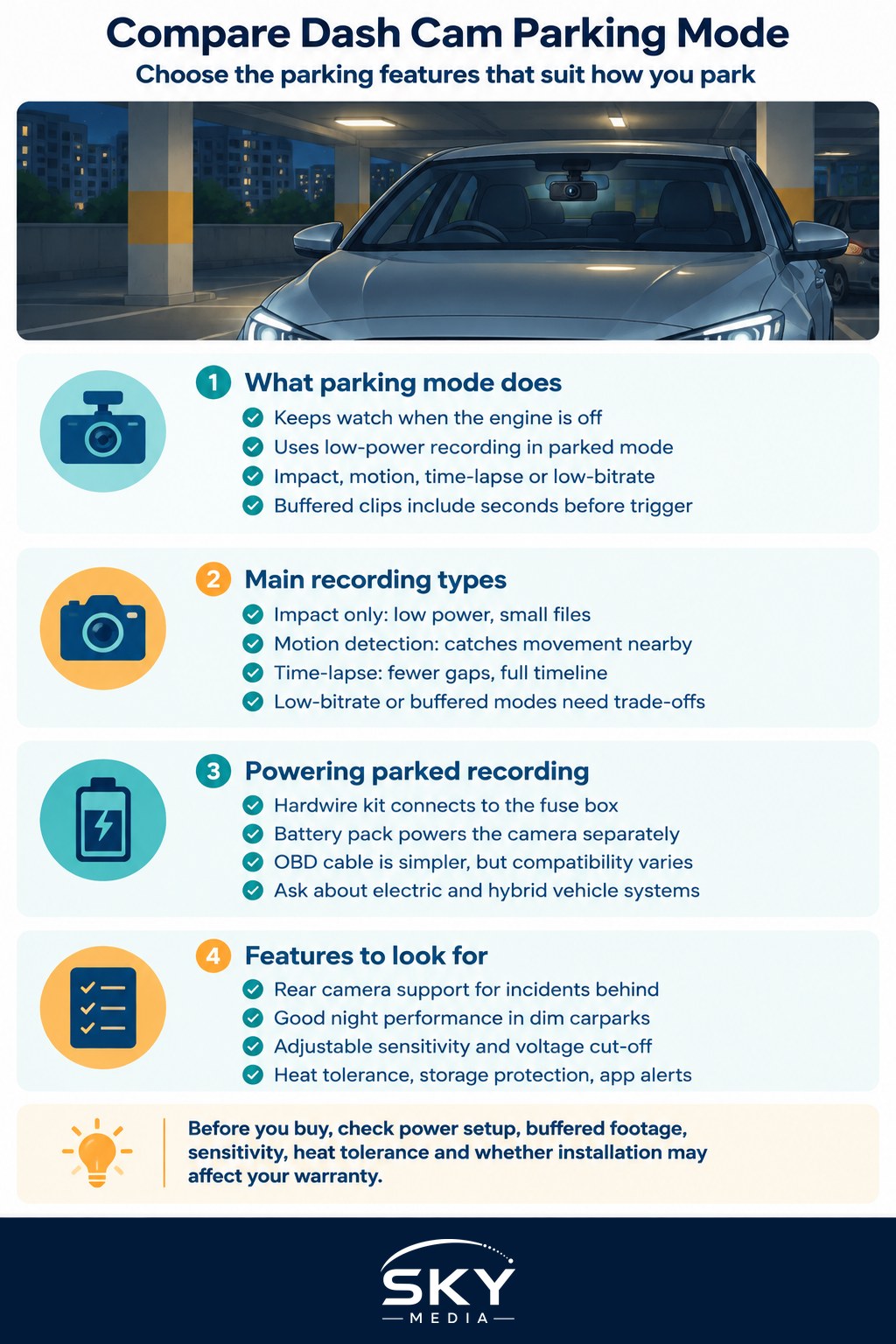
When the engine is off, a dash cam in parking mode keeps watching the car in a low-power state. Instead of recording continuously like it does while driving, it usually switches to one or more of these behaviours:
- Impact detection. A built-in sensor, often called a G-sensor, notices a bump or knock and saves a clip around that moment.
- Motion detection. The camera watches for movement in front of the lens and records when something moves.
- Time-lapse recording. The camera records continuously at a low frame rate, compressing hours of footage into short files.
- Low-bitrate recording. Continuous recording at reduced quality to save storage and power.
- Buffered recording. The camera keeps a rolling few seconds in memory, so when it is triggered, the saved clip includes what happened just before the event, not only after.
Buffered recording is one of the most important differences between models. Without it, an impact clip may start after the moment that matters, which is far less useful as evidence.
Comparing the Main Parking Recording Types
Each method trades power use, storage and coverage differently. This comparison shows the general pattern.
| Recording type | How it captures events | Strengths | Trade-offs |
|---|---|---|---|
| Impact only | Saves a clip when a knock is detected | Very low power use, small files | May miss events that do not shake the car, like a scrape |
| Motion detection | Records when movement appears in frame | Catches people approaching the car | Busy carparks can trigger many unnecessary clips |
| Time-lapse | Low-frame continuous recording | Fewer gaps, shows the full timeline | Fast events may look jumpy, higher power use |
| Low-bitrate continuous | Normal frame rate at lower quality | Smooth footage of everything | Uses more storage and battery than other modes |
| Buffered event recording | Keeps seconds before the trigger | Captures the lead-up to an incident | Usually needs constant power to work well |
Many cameras combine modes, for example time-lapse with impact-triggered full-quality clips. Check exactly which combinations a model allows.
How Parking Mode Is Powered
A dash cam plugged into the cigarette lighter socket usually loses power when the engine stops, depending on your car. To record while parked, it needs another source.
- Hardwire kit. Connects the camera to the car’s fuse box. Most kits include a voltage cut-off, which switches the camera off before the car battery drops too low to start the engine. Installation is best done by a trained installer, as poor wiring can affect your car’s electrics or warranty.
- Dedicated dash cam battery pack. A separate battery that charges while you drive and powers the camera when parked. This protects the car’s own battery but adds cost and needs space under a seat or in the cabin.
- OBD power cable. Plugs into the car’s diagnostic port. It is simpler than hardwiring, but compatibility varies by car model, so check before buying.
Electric and hybrid vehicles can behave differently, as their 12-volt systems are managed in their own way. Ask the installer or the car’s agent before connecting anything.
Features That Make Parking Footage Actually Useful
Beyond the recording type, look closely at these details in specifications and reviews.
- Rear camera support. Many carpark incidents happen behind the car. Dual-channel cameras record both ends, though they draw more power.
- Night performance. Basement carparks are dim. Look for good low-light sensors and check sample footage at night, not just in daylight.
- Adjustable sensitivity. You should be able to tune impact and motion sensitivity so wind, vibrations from nearby traffic or rain do not create endless clips.
- Voltage cut-off settings. A good kit or camera lets you set the cut-off level and a timer for how long parking mode runs.
- Heat tolerance. Cars parked in open-air carparks get very hot inside. Many drivers prefer cameras that use supercapacitors rather than lithium batteries for better heat tolerance. Check the manufacturer’s stated operating temperatures.
- Event notifications. Some cameras connect to an app and alert you when an impact is detected. This usually needs cloud services or a mobile data connection, which may involve a subscription. Our guide to car apps and connected features explains how these services generally work.
- Storage management. Parking clips should be stored in a protected folder so they are not overwritten. Use a high-endurance memory card rated for constant recording.
Matching Parking Mode to How You Park
The best setup depends on your routine rather than on the most advanced feature list.
- Mostly covered, multi-storey HDB or office carparks. Impact detection with buffered recording often covers the most common bumps without draining power.
- Open-air carparks or roadside parking. Consider time-lapse or low-bitrate continuous recording, plus a camera that handles heat well.
- Car parked for long stretches. If you drive only a few times a week, prioritise strong voltage protection, or a separate battery pack, so the car still starts.
- Concerned about deliberate damage. Motion detection with a rear camera, plus app alerts, gives you the best chance of seeing who approached.
Questions to Ask Before You Buy
- Does parking mode need a hardwire kit or battery pack, and is it included?
- Does the model record buffered footage before an event?
- Can I adjust sensitivity and the voltage cut-off?
- How does it perform in heat and low light?
- Does installation affect my car’s warranty?
Also remember that recordings can show other people and their vehicles. Use footage responsibly, mainly for insurance claims and police reports, and avoid sharing it publicly in ways that identify bystanders unnecessarily. A parking-mode camera works best alongside your car’s other protections, which you can read about in modern car safety features explained.
Frequently Asked Questions
Will a dash cam with parking mode drain my car battery? It can if it is powered badly. A hardwire kit with a voltage cut-off switches the camera off before the battery gets too low to start the engine, and a dedicated battery pack protects the car’s own battery. For a car parked a long time, prioritise this protection.
Why do some dash cams buffer footage before an impact? Buffered recording keeps a rolling few seconds in memory, so the saved clip includes the lead-up to the event, not only the moment after. Without it, an impact clip may start too late to show what mattered as evidence.
Is a dash cam with a rear camera worth it for parking? Often yes, since many carpark incidents happen behind the car. Dual-channel cameras record both ends, though they draw more power. Check night performance too, as basement carparks are dim.
Should I install a hardwire kit myself or use a professional? A trained installer is best, because poor wiring can affect your car’s electrics or warranty. Electric and hybrid vehicles manage their 12-volt systems differently, so ask the installer or the car’s agent before connecting anything.
Can I share my parking footage online? It is better not to. Recordings can show other people and their vehicles, so use footage mainly for insurance claims and police reports, and avoid posting it publicly in ways that identify bystanders unnecessarily.
Further reading: Reverse Cameras and Parking Sensors