

An unknown number rings during dinner, a text says your parcel is stuck, or a “bank officer” warns your account has been compromised. Dealing with spam calls in Singapore has become a daily annoyance for many people, and some of these calls are not just a nuisance but an outright scam. The good news is that a few simple habits, plus the blocking tools already built into your phone, can cut the noise sharply and keep you safe. This guide explains how to recognise the warning signs, how to block and filter unwanted contact, and how to report the worst offenders.
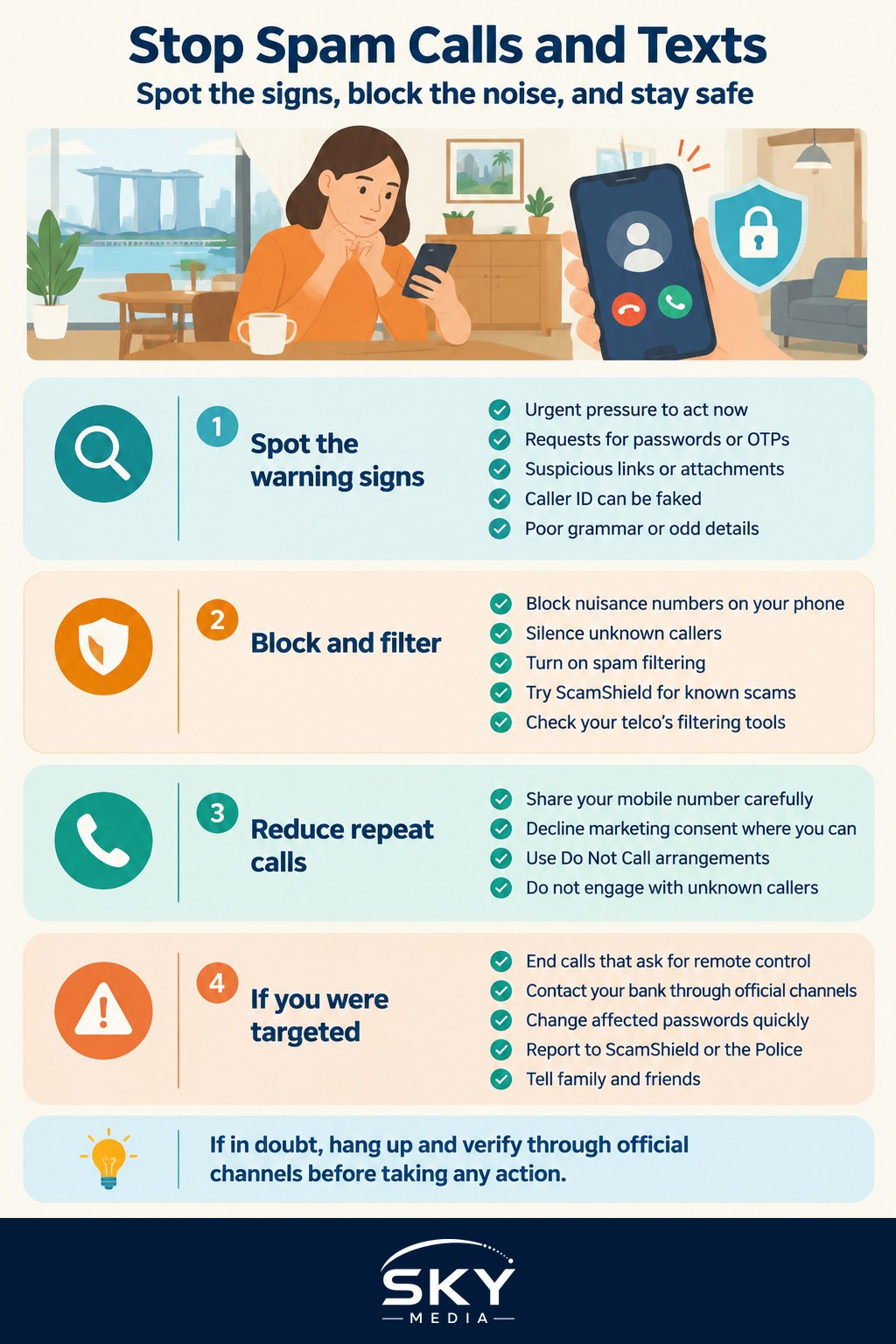
How to Spot a Spam or Scam Call and Text
The first line of defence is a healthy dose of suspicion. Spam is often harmless marketing, but scams are designed to rush you into a mistake, so learning the signs matters.
Watch for pressure and urgency. Scammers want you panicked and acting fast, so they claim your account is frozen, a warrant is out for your arrest, or a payment failed and must be fixed “right now”. Real organisations give you time and proper channels to check.
Be alert to unexpected requests for information or money. A genuine bank, telco, or government agency will never ask you to hand over your full password, banking login, or a one-time password over a call or text. If a message asks you to “verify” yourself by sharing these, it is a scam, full stop.
Treat links and attachments with caution. A text saying your parcel needs a small fee, or that you have won a prize, often carries a link to a fake website built to steal your details. When in doubt, do not tap. Our guide to recognising parcel and delivery scams shows the common tricks in detail.
Do not trust caller ID alone. Numbers can be faked so a call appears to come from a bank or a local line. Some overseas scam calls also show a warning label on newer phones, but never rely on the display to decide who is really calling.
Notice the odd details. Poor grammar, a generic “Dear customer”, a request to move the chat to another messaging app, or a story that keeps changing are all red flags. If something feels off, it usually is.
How to Stop and Block Unwanted Calls and Texts
Once you can spot the bad ones, the next step is to reduce how many reach you at all. Your phone and telco already offer useful tools.
Use your phone’s built-in blocking. On both iPhone and Android you can block a specific number after a nuisance call or text, and you can also silence calls from unknown numbers so they go straight to voicemail without ringing. This alone quiets most repeat offenders.
Turn on spam filtering. Many phones can filter suspected spam messages into a separate folder, and some can screen or label suspicious calls. Check your Messages and Phone settings, or ask your telco what call and SMS filtering they provide.
Consider the ScamShield app. Singapore’s ScamShield tool can help block known scam calls and filter scam messages on your phone, and it lets you check and report suspicious contacts. Install it from the official app store and follow the in-app guidance. For the wider picture, see our overview of using ScamShield and Singapore’s anti-scam tools.
Reduce marketing calls at the source. Be careful where you share your mobile number, decline marketing consent when you can, and register with the national Do Not Call arrangements if you wish to cut telemarketing. Every place you hand over your number is a place it might be passed on.
Most importantly, do not engage. You do not owe a stranger a conversation. Do not press numbers to “opt out”, do not confirm your name, and do not call back an unknown number that rang once. Hang up, block, and move on. Engaging often marks your number as active and invites more calls.
What to Do If You Are Targeted or Caught Out
Even careful people get caught, and acting quickly limits the damage.
Never let anyone take remote control of your device or “verify” your identity over a surprise call. Legitimate staff do not need to see your screen or your codes. If someone insists, end the call.
If you shared a one-time password, banking login, or personal details, contact your bank immediately through the official number on your card or app, not a number the caller gave you. Change affected passwords, and if you think an account is compromised, our guide to recovering a hacked account walks through the steps.
Report scams to the proper channels. You can report scam calls and messages to ScamShield through the app, and you can report to the Police, for example through their anti-scam channels, if you have lost money or shared sensitive information. Reporting helps protect others, as it feeds the systems that block these numbers.
Warn family and friends, especially elderly relatives who are often targeted. A quick heads-up about the latest trick can stop someone you love from a costly mistake.
A Calm, Simple Routine
You will not stop every spam call, but you can take back control. Stay suspicious of urgency, never share your OTP or logins, block and silence the numbers that bother you, and lean on ScamShield and your telco’s filters. When something slips through, do not engage, verify through official channels, and report it. Do check the latest official guidance from ScamShield and the authorities now and then, because the tactics change, and a few good habits will keep the noise, and the risk, well under control.
Frequently Asked Questions
Why do I keep getting spam calls and texts? Your number may have been shared through sign-up forms, past data leaks or random number generation by scammers. Once a number answers, it is often marked as active. Avoid giving your number out freely and do not engage with unknown callers.
Is it safe to call back a number that missed-called me? It is best not to. Some missed calls are bait to get you to ring back, possibly a premium or overseas number. If you think the call may have been genuine, look up the organisation’s official number and call that instead.
Can the Do Not Call registry stop scam calls? No. It is meant to reduce legitimate telemarketing messages, and scammers ignore it. For scams, use phone blocking, ScamShield and caution. Check the PDPC for how the registry works and what it covers.
How do I protect elderly parents from scam calls? Install ScamShield on their phone, silence unknown callers and agree a rule that they never share OTPs or passwords. Have them hang up and call you or the bank on an official number. Walk through recent scam examples together.
Does blocking a number stop spammers from calling again? It stops that one number, but spammers often switch to new ones. Combine blocking with silencing unknown callers and a filter such as ScamShield. If you want to lessen nuisance calls further, ask your telco about its filtering options.