

Parcel scams in Singapore usually arrive as an ordinary looking text message: a delivery could not be completed, a small fee is owed, or an address needs confirming. With so many of us shopping online and expecting packages, these messages feel plausible, which is exactly why they work. This guide walks through how to recognise the common tricks, how to verify a real delivery, and what to do if you have already tapped a link, all without panic.
The good news is that almost every version of this scam depends on you doing one thing quickly: clicking a link or handing over information before you have had time to check. Slowing down for thirty seconds defeats most of them.
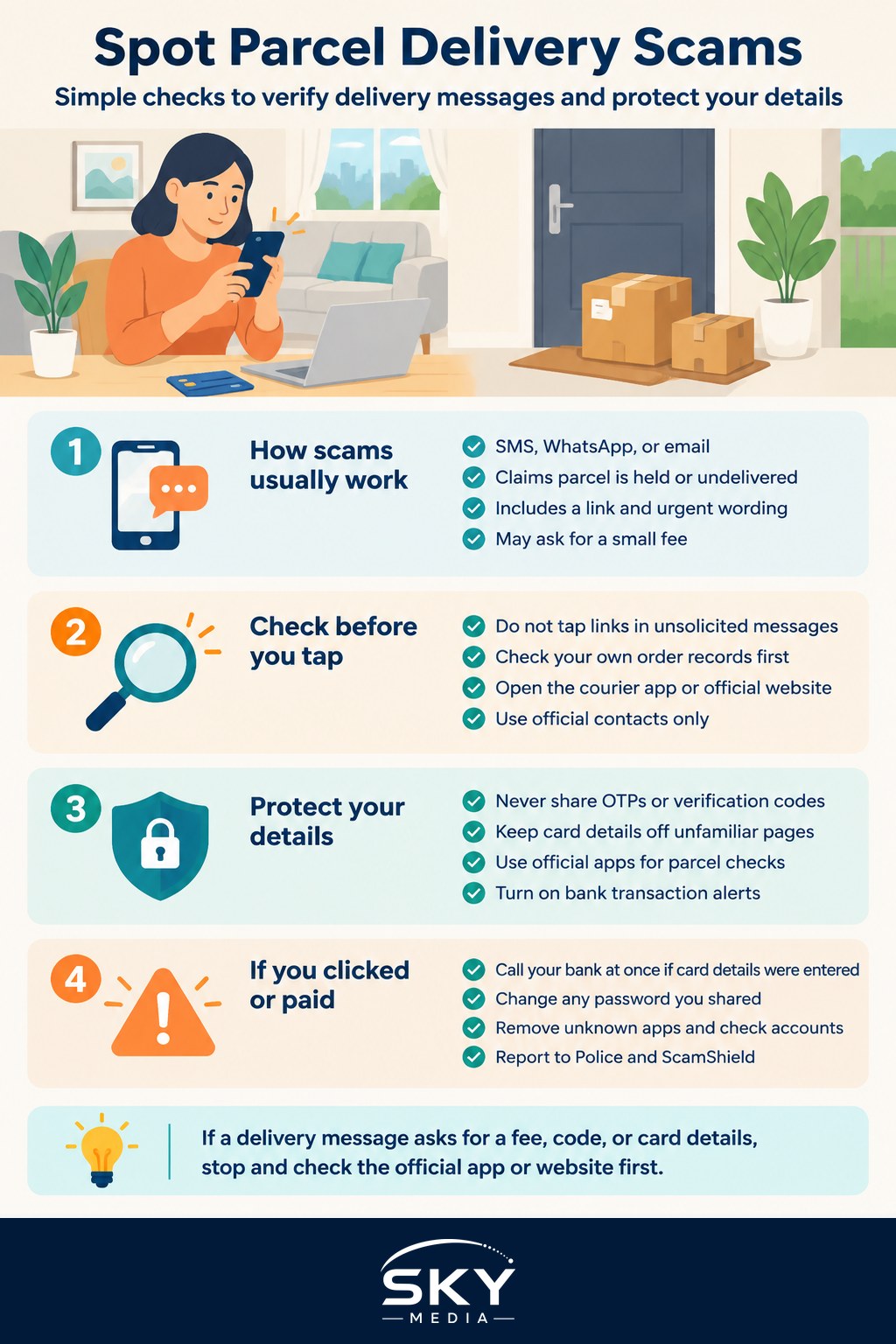
How Parcel Scams Usually Work
The pattern is remarkably consistent. You receive an SMS, WhatsApp message, or email claiming to be from a courier or the postal service. It says your parcel is held, undelivered, or stuck at customs, and that you must act now. There is almost always a link, and often a sense of urgency or a small “fee” to make the request feel routine.
Tap the link and you land on a page that looks like a real courier website. It asks for your address, your card details to pay a redelivery fee, or a login. Some pages ask you to install an app or approve a request. Whatever the wrapper, the goal is to collect your personal and payment details, or to get access to your phone or accounts.
A few features give these messages away:
- Urgency and small amounts. A tiny “fee” of a dollar or two feels harmless, so people pay without thinking. That is the point.
- Links to unfamiliar web addresses. Real couriers use their own domains. Scam links often use odd spellings, extra words, or link shorteners.
- You were not expecting anything, or the details are vague. No tracking number, no order reference, no item description.
- Requests for card details or logins. A genuine redelivery rarely needs your full card details through an SMS link.
- Pressure to install something or approve a code. No legitimate delivery requires you to install an unknown app to receive a parcel.
Scammers also send these in bulk, so you may get a “missed delivery” notice when you have nothing on the way at all. That mismatch is a clear signal.
Verify Before You Tap
The single most useful habit is to verify deliveries through official channels, never through the link in the message. Here is the safe sequence:
- Do not tap the link. Treat any delivery link in an unsolicited message as suspect until proven otherwise.
- Check your own records. If you were expecting a parcel, you will usually have an order confirmation with a tracking number from the shop or the courier.
- Go to the courier directly. Open the courier’s official app, or type their known website address into your browser yourself. Paste the tracking number there.
- Contact the courier through official contacts only. Use the phone number or help page listed inside the official app or on the official website. Do not rely on a number supplied in the suspicious message, and do not assume a number is genuine just because it appears in a search result advert.
If a message claims a fee is owed, be especially cautious. Genuine charges, when they exist, are normally handled inside the official app or at collection, not through a random SMS link asking for card details.
Below is a quick comparison to help you separate a genuine notification from a likely scam.
| Signal | Genuine delivery notice | Likely parcel scam |
|---|---|---|
| Sender and link | Official app or a web address you typed yourself | Unknown link, odd spelling, or a shortened URL |
| Order details | Matches your tracking number and item | Vague, no reference, or you ordered nothing |
| Payment request | Handled in-app or at collection | SMS link asking for full card details or a “small fee” |
| Tone | Informative, no pressure | Urgent, threatening, act-now wording |
| Extra steps | None unusual | Install an app, approve a code, share an OTP |
Protect Your Details
A few settings and habits reduce your exposure well before any scam message arrives.
- Never share one-time passwords (OTPs) or verification codes. No courier needs them. A code sent to your phone is for you alone.
- Keep card details off unfamiliar pages. If a page reached through a message asks for your card, stop.
- Use official apps. Installing the genuine courier apps you actually use means you can check any claim in seconds and ignore stray messages.
- Turn on transaction alerts with your bank so you see any charge immediately.
- Keep your phone and browser updated, which helps block known malicious sites and apps.
It also helps to talk about these scams with family members who may be less familiar with them. Older relatives in particular are often targeted, and a quick conversation about “never tap delivery links, always check the app” goes a long way.
If You Have Already Clicked or Paid
Mistakes happen, and acting quickly limits the damage. Stay calm and work through the steps:
- If you entered card details, contact your bank straight away using the number on the back of your card or inside your banking app, and ask them to block the card and watch for unauthorised transactions.
- If you shared a password, change it immediately, and change it anywhere else you reused it. Turn on two-step verification.
- If you installed an app or approved something, remove the app, run a security check, and consider resetting affected accounts.
- Report it. Report scams to the Police and use Singapore’s anti-scam tools such as ScamShield. Look up the official reporting contacts through the Police or ScamShield’s own website rather than relying on numbers from messages or adverts.
- Warn others. A quick heads-up to family and colleagues can stop the same message catching someone you know.
Reporting matters even when you did not lose money. It helps authorities track campaigns and warn the wider public, and it may help block the numbers and sites involved.
Building the Right Instincts
Parcel scams work by borrowing the ordinary rhythm of online shopping. The defence is not fear but a simple, repeatable habit: when a delivery message arrives, do not tap the link, open the official app instead, and check the tracking number yourself. If anything asks for a code, a card number, or an urgent fee, treat that as your cue to stop.
Most of us will keep receiving these messages, because they are cheap to send in bulk. Recognising the pattern means you can delete them in seconds and get on with your day, confident that your real parcels are safe in the apps you already trust.
Explore more
Using ScamShield and Singapore’s Anti-Scam Tools
How to Recognise Phishing Emails and SMS
Recovering a Hacked Account
Two-Factor Authentication Guide