
A gaming account is worth more than most people realise. Years of purchased games, rare skins, trading inventory and linked payment cards make it a tempting target, and scammers know gamers are often young, trusting and chatting with strangers all day. Most account takeovers are not clever hacks. They are social engineering: a friendly message, a fake login page, or a “trade” that is not what it seems.
This guide explains how to secure a Steam account and your console logins properly, then walks through the scams aimed specifically at gamers so you can recognise them before you click. If you are new to the platform, start with our guide to getting started with Steam first.
Lock Down Steam First: The Settings That Matter
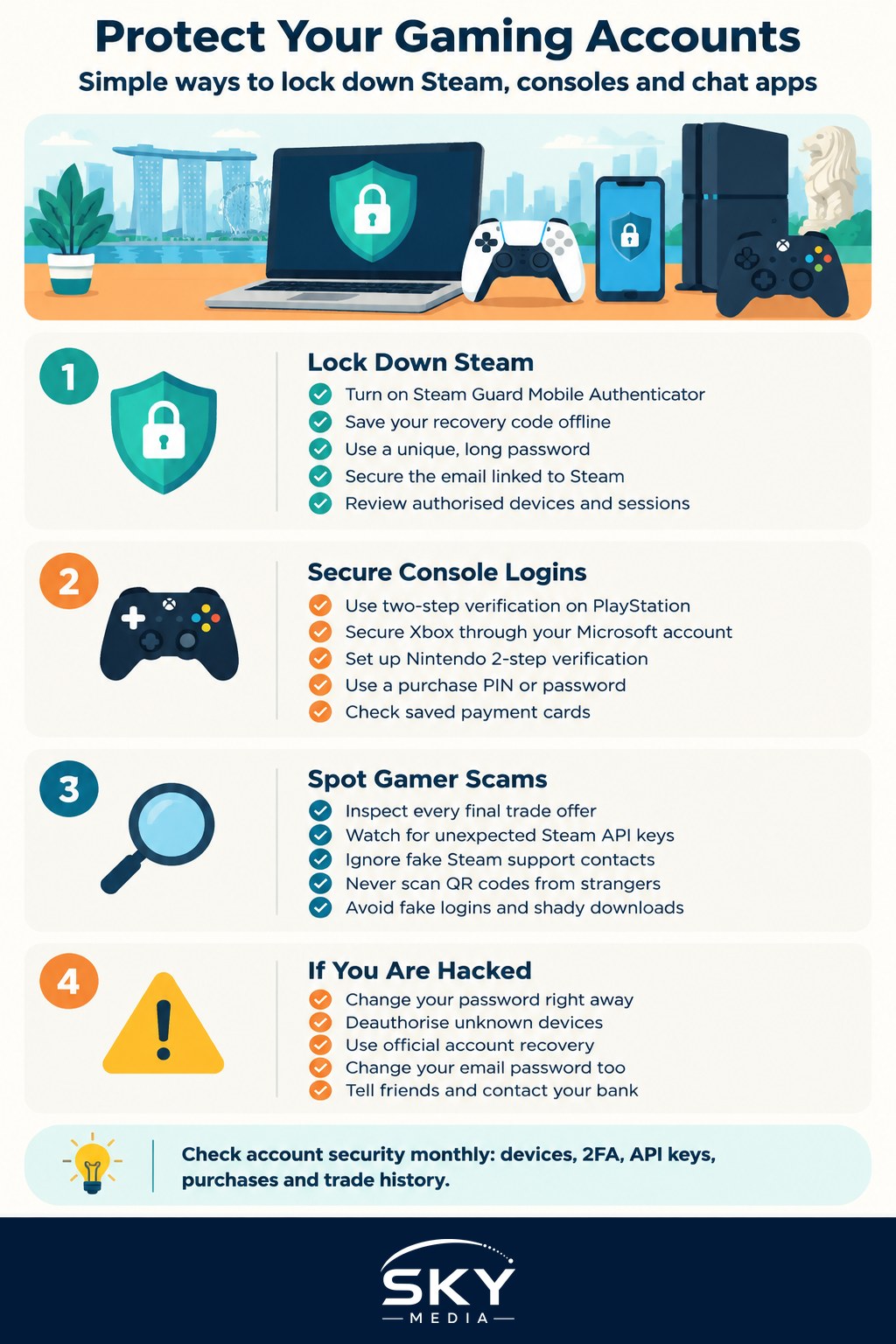
To secure a Steam account, these are the settings worth checking today. Names and menus can change with updates, so look for the equivalent option if the wording differs.
- Turn on the Steam Guard Mobile Authenticator. Steam Guard via email is better than nothing, but the authenticator in the official Steam mobile app is much stronger. It generates login codes and lets you approve or deny sign-ins and trade confirmations on your phone.
- Save your recovery code. When you set up the authenticator, Steam gives you a recovery code. Write it down and store it somewhere safe offline. Without it, losing your phone can lock you out.
- Use a unique, long password. Never reuse your email or social media password on Steam. A password manager makes this painless.
- Secure the email account behind it. Whoever controls your email can often reset your Steam password. Put strong two-factor authentication on that email too.
- Review authorised devices and sessions. In your account settings you can see where you are signed in and deauthorise devices you do not recognise.
- Check your Web API key page. If you have never created an API key yourself, there should not be one. An unexpected key is a classic sign of a compromised account (more on this below).
- Limit stored payment methods or use a card with spending alerts.
Console Accounts: Turn On Two-Factor Everywhere
Console accounts are just as valuable, and each platform offers its own form of two-step verification:
- PlayStation: turn on 2-step verification in your PlayStation account security settings, ideally with an authenticator app rather than SMS.
- Xbox: your Xbox profile is a Microsoft account, so you secure it through Microsoft’s account security page. Turn on two-step verification and consider the Microsoft Authenticator app or a passkey.
- Nintendo: Nintendo Accounts support 2-step verification using an authenticator app. Set it up from the Nintendo Account website.
Also set a purchase PIN or password on each console, especially if children use it, and check which payment cards are saved. Many of the same principles apply to your other subscriptions, covered in how to secure your streaming accounts.
The Scams Aimed at Gamers
Two-factor authentication blocks most password attacks, so scammers focus on tricking you into handing over access yourself. These are the patterns that come up again and again.
Fake trades and item swaps. A trader offers a great deal, then at the last moment the item in the trade window is swapped for a lookalike of far lower value, or the “middleman” they suggest is an accomplice. Always inspect the final trade offer, including item names and details, before confirming on your phone.
The API key scam. You are sent to a convincing third-party trading or skin site and asked to “log in with Steam” on a fake page. Once the scammer has a session, they quietly create a Web API key on your account. From then on, they can watch your trade offers and cancel genuine ones, replacing them with near-identical offers that send items to their own account. Checking for an unexpected API key is the fix.
“I accidentally reported you.” A stranger, sometimes posing as a friend, says they reported your account by mistake and you must contact “Steam support” to avoid a ban. The “support agent” is on Discord or another chat app and asks for your login, codes or a trade. Real Steam support does not contact you through Discord.
Discord phishing. Messages promising free Nitro, free skins, a giveaway win, or “vote for my team in a tournament” lead to fake login pages. A related trick is a QR code that, if scanned with your Discord app, logs the scammer into your account. Never scan a QR code a stranger sends you.
Fake login pop-ups. Some phishing sites draw a fake browser window inside the page, complete with a realistic Steam address bar. If a login box cannot be dragged outside the browser window, or something feels off, close the tab and log in by typing the official address yourself.
“Test my game” and fake downloads. A friendly contact asks you to try their indie game or a mod. The file is malware that steals saved passwords and session tokens, which can bypass two-factor authentication. Only download from official stores.
Account sharing and boosting offers. Paying someone to boost your rank, or lending your login to a friend of a friend, hands over full control. It also usually breaks the platform’s terms of service.
Red Flags vs Safe Practice
| Situation | Red flag | Safe practice |
|---|---|---|
| A trade offer arrives | Pressure to accept fast, items swapped at the last step | Read every item on the mobile confirmation screen before approving |
| A “support agent” contacts you | Contact is through Discord, chat apps or friend requests | Open a ticket only through the official Steam Support site |
| A site asks you to log in with Steam | The URL is slightly misspelled or the pop-up cannot leave the page | Type the official address yourself or use the Steam app |
| Someone sends a file or QR code | “Just test my game” or “scan to claim your prize” | Do not run files or scan codes from people you have not verified |
If Your Account Has Been Taken Over
Act quickly, as stolen items and funds move fast.
- Try to sign in and change your password immediately, then deauthorise all other devices.
- If you cannot get in, use the official account recovery process on the platform’s own support site. Have proof of ownership ready, such as purchase receipts or the card used.
- Check for and revoke any Web API key you did not create, and remove unfamiliar authorised apps.
- Change your email password and check its forwarding rules, since hijackers sometimes add a silent forward.
- Run a reputable malware scan on your computer if you downloaded anything suspicious.
- Warn your friends list, as hijacked accounts are often used to scam people who trust you.
- If money or payment cards were involved, contact your bank. In Singapore you can also report scams to the Singapore Police Force and check suspicious messages through the ScamShield service. Keep screenshots of chats and trade history.
Platforms usually cannot guarantee that lost items will be returned, so prevention matters most.
Teaching Younger Gamers the Basics
Children and teens are frequent targets, partly because they are generous with friend requests. A few simple house rules help:
- Never share passwords or codes, even with friends.
- No real support staff will ask for your login on Discord or in game chat.
- Ask a parent before clicking giveaway links or trading with strangers.
- Use family settings on Steam and consoles to manage spending and contacts.
Keep the tone matter-of-fact. Kids who know they will not get in trouble for reporting a mistake tell you sooner, when recovery is easiest.
A Monthly Five-Minute Routine
Securing your accounts is not a one-off job. Once a month, glance through authorised devices, check the API key page on Steam, confirm two-factor authentication is still on for each console and your email, and review recent purchases and trade history. Combined with a healthy suspicion of anything urgent, free or “too good to be true”, that routine will keep your library and inventory where they belong.
Explore more: Keeping Your Smart Home Devices Secure