

Your Google account is often the master key to your digital life. It holds your email, your photos, your calendar, your contacts, and it quietly signs you in to dozens of other apps and websites. That is exactly why it is such a tempting target. Good google account security singapore readers can set up in an afternoon is not complicated, and it makes the difference between a minor scare and a genuine disaster. This guide walks you through the practical steps, in plain language, so you can lock things down without needing to be a tech expert.
Why Your Google Account Deserves Extra Care
Think about everything tied to one Gmail address. If someone gets in, they can read your private messages, reset the passwords on your other accounts using “forgot password” links sent to your inbox, download your photos, and see where you have been. For many people in Singapore, the same account is also linked to their phone, their app purchases, and their backups. Losing control of it is not like losing one login. It can unravel everything.
The good news is that Google gives you strong, free tools to protect yourself. Most attacks are not clever hacks. They are simple tricks that rely on a weak password, a reused password, or a moment of panic during a scam call. Once you close those gaps, you become a much harder target, and most opportunistic attackers simply move on.
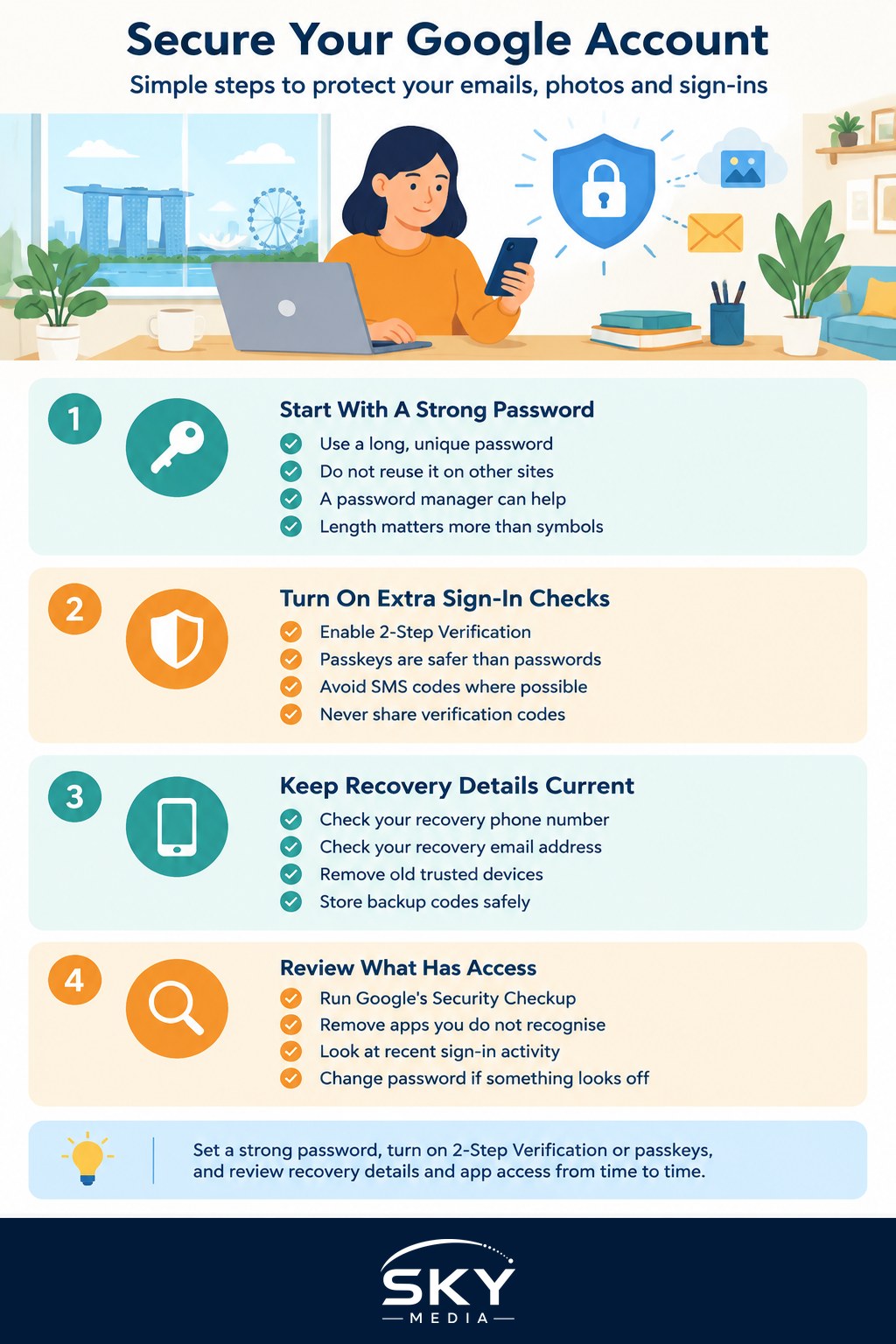
Start With a Strong, Unique Password
The foundation of everything is a password that is long, unique, and used nowhere else. If you reuse the same password across sites, a leak at one careless website hands criminals the key to your Google account too. The simplest way to manage this is a password manager, which remembers strong passwords so you do not have to. Our guide to choosing a password manager explains how to pick one and what makes a password genuinely hard to crack.
A good password is more about length than strange symbols. A short phrase of unrelated words is easier to remember and harder to guess than something like “Passw0rd!”. Whatever you choose, it must be different from the password you use for banking, shopping, or social media.
Turn On Two-Step Protection
This is the single most important step. Two-factor authentication, sometimes called 2-Step Verification, means that even if a criminal steals your password, they still cannot get in without a second check on a device you own. In your Google account security settings, look for the 2-Step Verification option and switch it on.
You have a few choices for that second step. App-based prompts and authenticator codes are far safer than text messages, because SMS codes can be intercepted through SIM swap tricks. Better still are passkeys, a newer and more secure way to sign in that uses your phone or laptop and your fingerprint or face, with no password to steal at all. Google supports passkeys, and they are worth setting up. Our explainers on two-factor authentication and using passkeys for passwordless login go deeper if you want to understand the options.
One firm rule to remember, no matter which method you use. Never read out a verification code or one-time password to anyone who calls or messages you. Google will never phone you to ask for it. Neither will your bank, and neither will any government agency. Anyone who does is a scammer, full stop.
Keep Your Recovery Details Up to Date
If you ever get locked out, Google uses your recovery phone number and recovery email to help you back in. If those details are old, you could be stranded. Worse, if a scammer manages to change them, they can lock you out permanently. Take a minute to check that your recovery phone and recovery email are current and that you still control them.
While you are there, review your list of trusted devices and remove any you no longer use, such as an old phone you have sold or given away. It is also worth writing down or safely storing your backup codes, which are one-time codes that let you in if you lose your phone. Keep them somewhere private, not in a note titled “passwords” on your desk.
Check What Is Connected to Your Account
Over the years, you probably clicked “Sign in with Google” on all sorts of apps, games, and websites. Each of those has some level of access to your account. Google offers a Security Checkup page that lists third-party apps with access, recent sign-in activity, and any alerts. Run through it now and again.
Remove anything you do not recognise or no longer use. If an app you have never heard of has access to your Gmail or Drive, cut it off. Look through recent security events too. If you see a sign-in from a place or device that is not you, change your password immediately and sign out of all sessions. This is one of the quickest ways to catch a break-in early.
Watch for the Scams That Target Google Users
Most break-ins start with a trick, not a technical hack. You might get an email that looks like a Google security alert, urging you to click a link and “confirm your account”. The link leads to a fake page that steals your password. Always be suspicious of urgent messages that push you to log in through a link. When in doubt, open your browser and type the address yourself instead of clicking. Learning to recognise phishing emails and SMS is one of the best defences you can build.
If you ever get an unexpected call from someone claiming to be from Google, a telco, or the authorities, asking you to verify your identity, install software, or grant remote access to your device, hang up. Never let a stranger control your screen. You can report scams and check suspicious messages using ScamShield and its helpline, and report any loss to the Police.
A Simple Security Routine
You do not need to do all of this every week. Set a strong, unique password with a password manager, turn on 2-Step Verification or passkeys, and confirm your recovery details are correct. Then, every few months, run Google’s Security Checkup, remove apps and devices you no longer use, and glance at recent activity. Stay calm and sceptical whenever a message tries to rush you. With those habits in place, your Google account, and everything it protects, becomes far safer, and you can get on with daily life knowing the master key is firmly in your own pocket.
Further reading: How to Recover a Locked Apple Account or Google Account