
Remember scratching parking coupons in a hot carpark, hoping you tore the right hole? Those days are largely behind us. Cashless parking singapore drivers rely on today means paying for many carparks straight from your phone, no coins, no coupons, no dashboard display to remember. It is one of the small but genuine improvements to daily driving here. This guide explains how these apps work, how to get set up, and how to use them well, without quoting any fees, since charges are set by the authorities and operators.
The Move Away From Coupons
For years, parking at many public carparks meant buying paper coupons, scratching out the date and time, and leaving them on your dashboard. It worked, but it was fiddly, easy to get wrong, and wasteful. Forget to display one, or misjudge how long you would stay, and you risked a fine.
Singapore has steadily moved towards a digital system. A national parking app, along with other approved apps, now lets drivers pay for parking at participating public carparks by entering their vehicle number and the carpark, then starting a parking session on their phone. You pay only for the time you use, and you can often stop the session early or extend it remotely if you are running late.
This shift means less waste, fewer fumbling moments, and no more keeping a stack of coupons in the glovebox. It also makes short stops much cheaper and simpler, since you are charged for actual time rather than a rounded block.
How Cashless Parking Apps Work
The core idea is simple. You tell the app where you are parked and start a session, and the app charges you for the time until you end it.
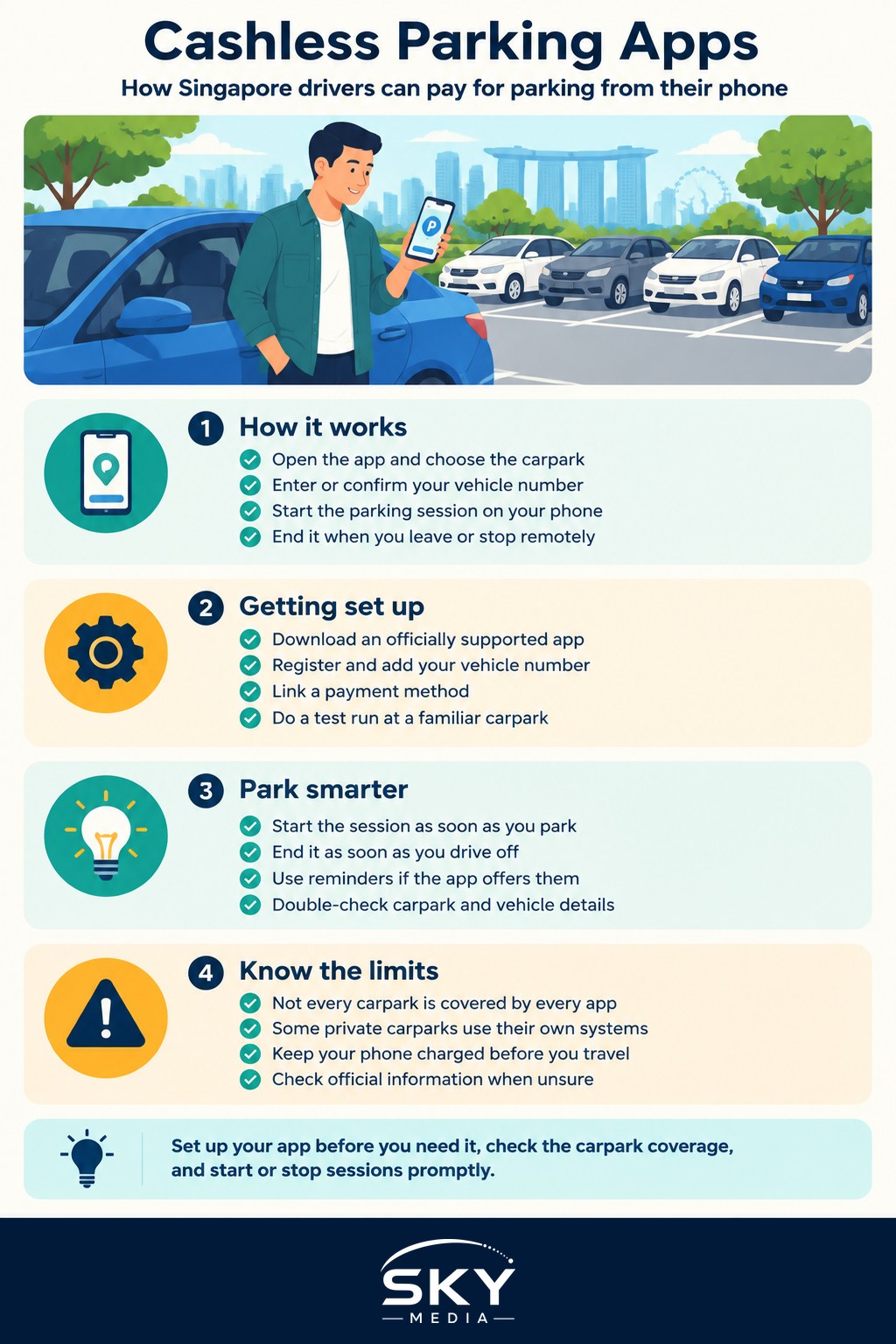
A typical flow looks like this:
- Open the app and select or confirm the carpark you are in
- Enter or confirm your vehicle registration number
- Start the parking session, sometimes choosing an estimated duration
- End the session when you leave, or let it run and stop it remotely
Because the system knows your start and stop times, you generally pay only for what you use. Some carparks and app features let you extend remotely, which is handy when a meeting runs long and you cannot get back to the car. Enforcement officers check vehicle numbers against active sessions, so there is no paper to display.
The exact apps, the carparks they cover, and any features differ, and they are updated over time, so check which apps are officially supported and how each carpark works through the official channels rather than assuming.
Setting Yourself Up
Getting started takes only a few minutes and saves a lot of hassle later.
- Download an officially supported parking app from your phone’s app store.
- Register an account and add your vehicle registration number.
- Link a payment method, such as a card or an accepted e-wallet.
- Do a test run at a carpark you use often so you are comfortable with the flow.
Once set up, paying for parking becomes a few taps. It is worth adding your vehicle details and payment method in advance, so you are not standing in a carpark trying to type it all in on your first go.
Tips to Park Smarter
A few habits make cashless parking smoother and cheaper:
- Start the session promptly when you park, and end it as soon as you drive off so you are not overpaying.
- Use reminders or notifications if the app offers them, so a session does not run longer than you intend.
- Double-check the vehicle number and carpark you select, especially in a hurry.
- Keep your payment method up to date so a session never fails at a bad moment.
Cashless parking is one piece of a wider set of digital tools that make driving here easier. If you like managing your journeys from your phone, our guide to planning your commute with transport apps covers the tools that pair well with a parking app, and car apps and connected features looks at what your car itself can do.
Where Season Parking Fits
Cashless apps are ideal for pay-per-use parking, but if you park in the same place every day, a monthly arrangement may suit you better. The two are not mutually exclusive: many drivers hold season parking for their regular carpark and use an app for everywhere else. Our guide to season parking in Singapore explains that option in full.
A Few Practical Reminders
Apps are convenient, but keep the basics in mind. Make sure your phone is charged before a trip, since a flat battery can leave you unable to start a session. Note that not every carpark is covered by every app, and some private carparks use their own systems or gantries. When in doubt about which app covers a given carpark or how charges apply, check the official information rather than guessing, and never let the convenience distract you while you are still driving.
The Bottom Line
Cashless parking in Singapore has made paying for a spot faster, fairer, and far less fiddly than the old coupon days. Set up an officially supported app with your vehicle number and payment method in advance, start and stop your sessions promptly, and pair it with season parking for your regular spot. Since supported apps, coverage, and charges change over time, confirm the current details through the official channels, and enjoy never scratching a coupon again.
Frequently Asked Questions
Do I still need paper coupons at any carparks? Some carparks and private operators use their own systems or gantries, so not every carpark is covered by every app. Look at the signs at the entrance, and check the official information on which apps cover which carparks.
What happens if I forget to end my parking session? You may be charged for the extra time until the session ends, so end it as soon as you drive off. Many apps let you stop a session remotely or send reminders. Check how your app handles this.
What if my phone battery dies while I am parked? You cannot start or extend a session without your phone, so charge it before a trip. If you started a session, enforcement checks the vehicle number against active sessions, so the parking itself remains valid until it ends.
Can I extend my parking time without going back to the car? Many apps let you extend a session remotely, which helps when a meeting runs long. Features differ between apps and carparks, so check what yours offers before you rely on it.
Which parking app should I download? Choose an officially supported app and check that it covers the carparks you use. Register your account, add your vehicle number and a payment method in advance, and do a test run in a carpark you know.
Official sources: Land Transport Authority (LTA)
Further reading: Best Parking Apps