
The parking apps singapore drivers rely on have made the old routine of fumbling for paper coupons and dashing back to top up almost a memory. Today a phone can pay for a parking session, remind you before it expires, and even help you find a space before you arrive. For anyone who drives regularly, whether to work, to run errands or to visit family across the island, the right app removes a daily source of small stress and the risk of a fine. This guide walks through the main types of parking app, how they work and how to use them safely, all in a brand-neutral way and without quoting any fees, which vary by location and change over time.
We will describe categories and features rather than promote particular products, because the best mix depends on where you drive and both apps and rules evolve. What stays constant is the goal: pay accurately, park confidently and never pay more than you have to.
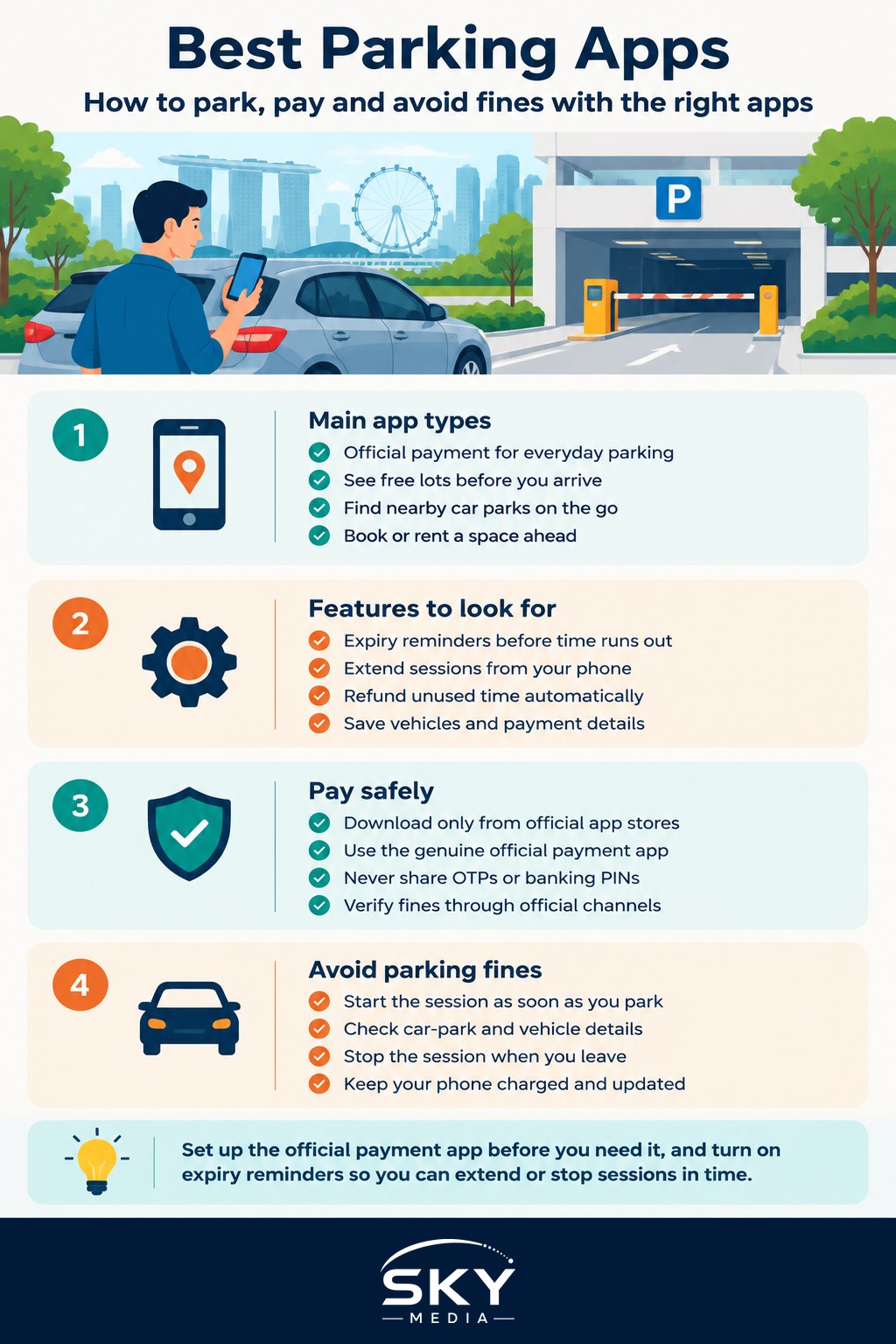
The Main Types of Parking App
Parking apps fall into a few broad categories, and most drivers end up using more than one. Knowing what each does helps you keep the right ones on your phone.
The most important category is the official electronic parking-payment system used across many public car parks and street parking spaces. This is the digital successor to paper coupons: you start a parking session from your phone when you park and stop it when you leave, so you pay only for the time you actually use rather than rounding up to the nearest block. Many such systems refund unused time automatically, which is a genuine saving over the old coupon method. Because this is the sanctioned way to pay in a great many spaces, it is the one app most Singapore drivers will want set up first.
Beyond official payment, several other types add convenience:
- Car-park availability apps show how many lots are free in malls, buildings and public car parks, so you can pick one with space before you set off.
- Navigation and transport apps increasingly show nearby car parks and sometimes their rates, helping you plan the last leg of a journey.
- Private and season-parking platforms let you book or rent a space in advance, useful near busy areas or for regular commutes.
- Ticketless entry systems, common in newer malls and buildings, read your number plate on entry and let you pay by app before you drive out.
Most drivers combine one payment app with one availability or navigation app, which covers the two questions that matter most: where can I park, and how do I pay.
Features Worth Having
Once you know the categories, the features are what make daily driving smoother. A few are worth prioritising because they directly prevent overpaying or getting fined.
Expiry reminders are the standout feature. A good app warns you before your parking session runs out, so you can extend it from your phone rather than rushing back to the car. Remote extension pairs with this, letting you add time from wherever you are, which is invaluable when a meeting or meal overruns. Automatic refunds of unused time reward you for stopping the session promptly, so look for apps that handle this cleanly.
Saved vehicle and payment details speed everything up, letting you start a session in seconds. If you drive more than one vehicle, the ability to switch between number plates quickly matters. A clear session history helps you track spending and claim expenses if you drive for work. For families or those who share a car, some apps let more than one person manage sessions for the same vehicle.
The table below sums up the main app types and what each is best at, so you can decide which combination suits your driving.
| App type | Main job | Best for |
|---|---|---|
| Official payment app | Pay per minute, refund unused time | Everyday public and street parking |
| Availability app | Show free lots before you arrive | Malls and busy areas at peak times |
| Navigation with parking | Route you to nearby car parks | Trips to unfamiliar places |
| Booking or season app | Reserve or rent a space ahead | Regular commutes and busy zones |
When choosing, favour apps that are widely accepted where you actually park, kept up to date, and clear about how they handle your payment and vehicle details. An app that works in only a handful of car parks near you is less useful than one accepted almost everywhere you go.
Paying Safely and Avoiding Fines
Because parking apps handle payment, treating them with the same care as any money app protects both your wallet and your car.
Download apps only from your phone’s official app store, and make sure you have the genuine official payment app rather than a copycat, since scam apps sometimes imitate popular ones. Set up payment through a method you can monitor, and check your session history now and then to confirm charges match your parking. Never share a one-time password, banking PIN or card details in response to a message or call claiming to be from a parking service, as legitimate apps do not ask for these outside their normal, secure sign-in. Beware of fake parking-fine notices sent by text or email with links, a common scam, and always verify any penalty through official channels rather than clicking through.
Avoiding fines is mostly about good habits the app supports. Start your session as soon as you park, not several minutes later, and double-check you entered the correct car-park and vehicle details, since a wrong entry can leave you technically unpaid. Turn on expiry reminders and act on them promptly, and remember to stop the session when you leave if your app is the pay-per-use type, so you get your refund and do not keep paying. Keep your phone charged and your app updated, because a flat battery or an outdated app at the wrong moment is an easy way to slip up.
Setting Yourself Up
Getting organised once saves effort every trip. Install the official payment app and register your vehicle and a payment method before you next need to park, so your first session is calm rather than rushed at the barrier. Add one availability or navigation app for finding spaces, and if you have a regular destination with tight parking, consider a booking or season option for it.
Take a few minutes to explore each app’s settings, switch on reminders, and save your details securely. With that groundwork done, parking becomes one less thing to think about: you drive up, tap to start, get a nudge before time runs out, and pay only for what you used. For anyone who spends time behind the wheel in Singapore, that quiet convenience is well worth the small setup.
Explore more
Transport Apps for Getting Around
Using NETS, GrabPay and Local E-Wallets
PayNow Explained
Best Productivity Apps
Frequently Asked Questions
Do parking apps refund unused parking time? Many electronic payment systems refund unused time automatically when you stop the session, which is a genuine saving over paper coupons. Remember to stop the session when you leave if your app is the pay-per-use type, and check your session history.
What happens if I forget to start my parking session straight away? Start your session as soon as you park, since a late start can leave you technically unpaid. Double-check you entered the correct car park and vehicle details. Expiry reminders also help you extend the session in time and avoid a fine.
How can I tell a fake parking-fine message from a real one? Be wary of notices sent by text or email with links, which is a common scam. Verify any penalty through official channels rather than clicking through. Legitimate apps do not ask for one-time passwords, PINs or card details by message or call.
Can I find a free parking space before driving to a mall? Car-park availability apps show how many lots are free in malls, buildings and public car parks, so you can choose one with space before you set off. Navigation and transport apps increasingly show nearby car parks too.
Can I manage parking for more than one car or share an app with family? Many apps let you save several vehicles and switch between number plates quickly. Some let more than one person manage sessions for the same vehicle, which suits families sharing a car. A clear session history also helps if you claim work expenses.
Further reading: Cashless Parking Apps