

Moving from mainland China to Singapore does not mean giving up the games you love. Many newcomers want to keep their Chinese game accounts, their progress, their friends lists and their guilds. Playing China games in Singapore is often possible, but it comes with practical issues that are easy to miss in the busy first weeks: phone number verification, payment methods, server distance, app store regions and account security. This guide walks through each one so you can plan before problems appear.
Every game and platform sets its own rules, and these rules can change. Always check the official help centre or customer service of the game publisher for the current position on overseas logins and account use.
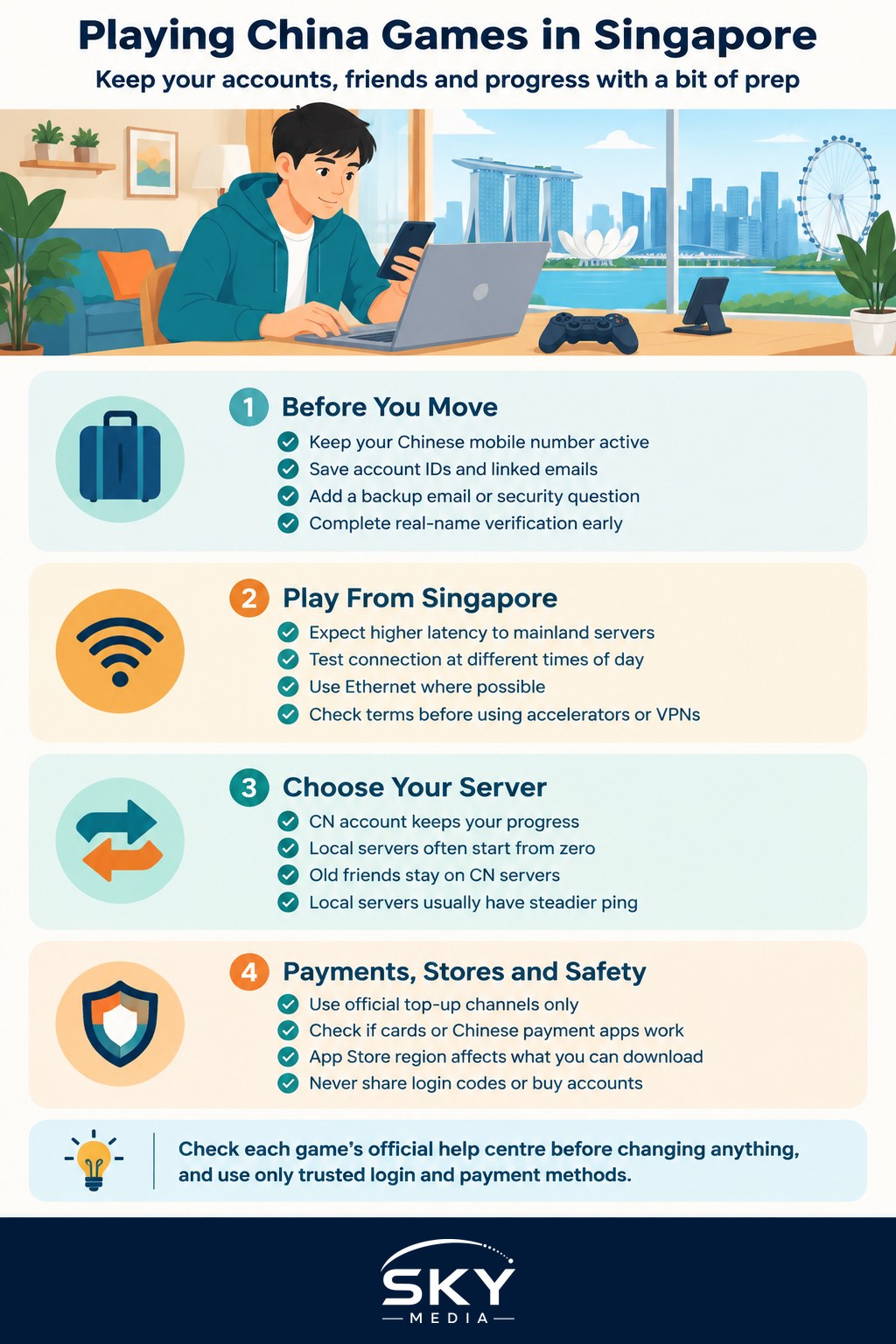
Before You Leave China: Protect Your Accounts First
The easiest fixes happen before you move. Once you are in Singapore, some recovery steps become harder.
- Keep your Chinese mobile number active. Most Chinese game accounts, and platforms like WeChat and QQ, use your mainland phone number for login codes and recovery. If the number is cancelled, you may lose access. Ask your Chinese carrier about plans that let you keep the number while abroad, and whether it can receive SMS overseas through roaming.
- Record your account details. Write down account IDs, linked email addresses and the platform each game uses (WeChat login, QQ login, or the publisher’s own account). Store them safely, for example in a password manager.
- Bind a backup method. Where a game allows it, add a secondary email or security question so you are not relying on SMS alone.
- Understand real-name verification. Many Chinese games require real-name identity verification linked to your Chinese ID. Make sure this is completed while you still have easy access to your documents.
- Note your remaining balances. Check any in-game currency, monthly cards or subscriptions, and plan when they will run out.
Accessing Chinese Game Servers From Singapore
Once in Singapore, the main technical challenge is distance. Your device connects to servers in mainland China, so data travels further.
- Expect some extra latency. For turn-based, card or idle games, this rarely matters. For fast action, shooter or fighting games, a higher ping can affect your timing.
- Test at different times. Network routes can be busier at peak hours. Play a few matches at different times of day to see how your connection behaves.
- Use a wired connection where possible. For PC and console, an Ethernet cable is usually more stable than Wi-Fi. Our guide to setting up home internet in Singapore explains the options when choosing a broadband plan.
- Game accelerators and VPNs. Some players use network accelerator services to improve the route to Chinese servers. Before using one, read the game’s terms of service, because some publishers restrict certain tools and accounts can be penalised. Use only reputable, legitimate services. Our guide on how to set up a VPN step by step covers the basics and what to check.
Some popular Chinese titles also run separate international or Asia servers. These usually give better ping from Singapore, but progress normally does not transfer between regional versions. You will need to decide whether to keep your old CN account or start fresh locally.
CN Server or Local Server: Choosing What Works for You
This comparison can help you decide where to play each game.
| Factor | Keep your China (CN) account | Start on an international or Asia server |
|---|---|---|
| Progress and items | Keeps all existing progress | Usually starts from zero |
| Friends and guild | Stay with your old community | Build a new local or regional circle |
| Connection from Singapore | Longer distance, possibly higher ping | Often closer servers and steadier ping |
| Login and verification | Relies on Chinese phone number and real-name checks | Usually email or international account login |
| Payments | Often needs Chinese payment methods | Local cards and app store top-ups usually supported |
| Language | Chinese interface and community | Often multiple languages, mixed players |
Many newcomers keep their CN account for long-held favourites and start fresh on local servers for new games, especially competitive ones.
Payments and Top-Ups While Living in Singapore
Topping up a Chinese game account from abroad can be tricky.
- Chinese payment apps. If you still use Alipay or WeChat Pay with your Chinese bank account, these may continue to work for top-ups. Check with the app and your bank about overseas use and any limits.
- Foreign cards. Some Chinese platforms accept international cards, others do not. Check each game’s payment page.
- Avoid unofficial top-up sellers. Third-party sellers offering cheap currency can lead to account bans or scams. Stick to official channels listed by the publisher.
- Watch currency and fees. Your bank may charge for overseas or cross-currency transactions. Check with your bank so there are no surprises.
App Stores and Devices
Your phone’s app store region affects what you can download.
- iPhone users. The App Store region is tied to your Apple account. Many Chinese games are only listed in the China store. Some people keep their existing China Apple account for these games and use a separate account for Singapore apps. Read Apple’s guidance before changing regions, because switching can affect subscriptions and balances.
- Android users. Phones bought in mainland China often use local app stores rather than Google Play. These may still work for Chinese games, but you might need Google Play for Singapore apps such as banking and government services.
- Updates. Keep games updated from the official source. Downloading game files from unknown websites risks malware.
Account Security and Healthy Habits
Playing from a new country can trigger security checks. A login from an unfamiliar location may ask for extra verification.
- Expect location alerts. Have your Chinese phone number ready to receive codes.
- Never share login codes. Scammers sometimes pose as game staff or friends asking for verification codes. Real customer service will not ask for them.
- Do not trade or sell accounts. This usually breaks terms of service and is a common scam route.
- Use strong, unique passwords. Enable any two-step verification the game offers.
- Set up your space. A comfortable setup helps on long sessions. See our tips on an ergonomic tech workspace.
If your children play, Chinese games often have their own minor protection systems tied to real-name verification. In Singapore, you can also use device-level controls on phones and consoles to manage play time.
Quick Checklist for China Newcomers
- Keep your Chinese mobile number active and able to receive codes.
- Note every account, its login method and recovery options.
- Test ping on your favourite games and decide CN or local server.
- Use only official top-up channels.
- Read each publisher’s terms before using any network tool.
- Protect your codes and passwords.
With a little preparation, your gaming life can move to Singapore with you, keeping old friendships alive while you build new ones here.
Further reading: Steam China vs Global Steam for Singapore Users