
Getting around the island means dealing with buses, trains, traffic, and the odd road closure. There is an official app built to pull much of that together in one place. This MyTransport.SG app guide for Singapore explains what the app is, who publishes it, and how everyday commuters and drivers can get value from it. It describes the official app in general terms, so always check the app itself or the official site for the current features and exact steps.
MyTransport.SG is the official mobile app from the Land Transport Authority, the government agency responsible for our roads and public transport. Because it comes straight from the LTA, its information tends to be accurate and up to date, drawn from official transport data.
What the app is for
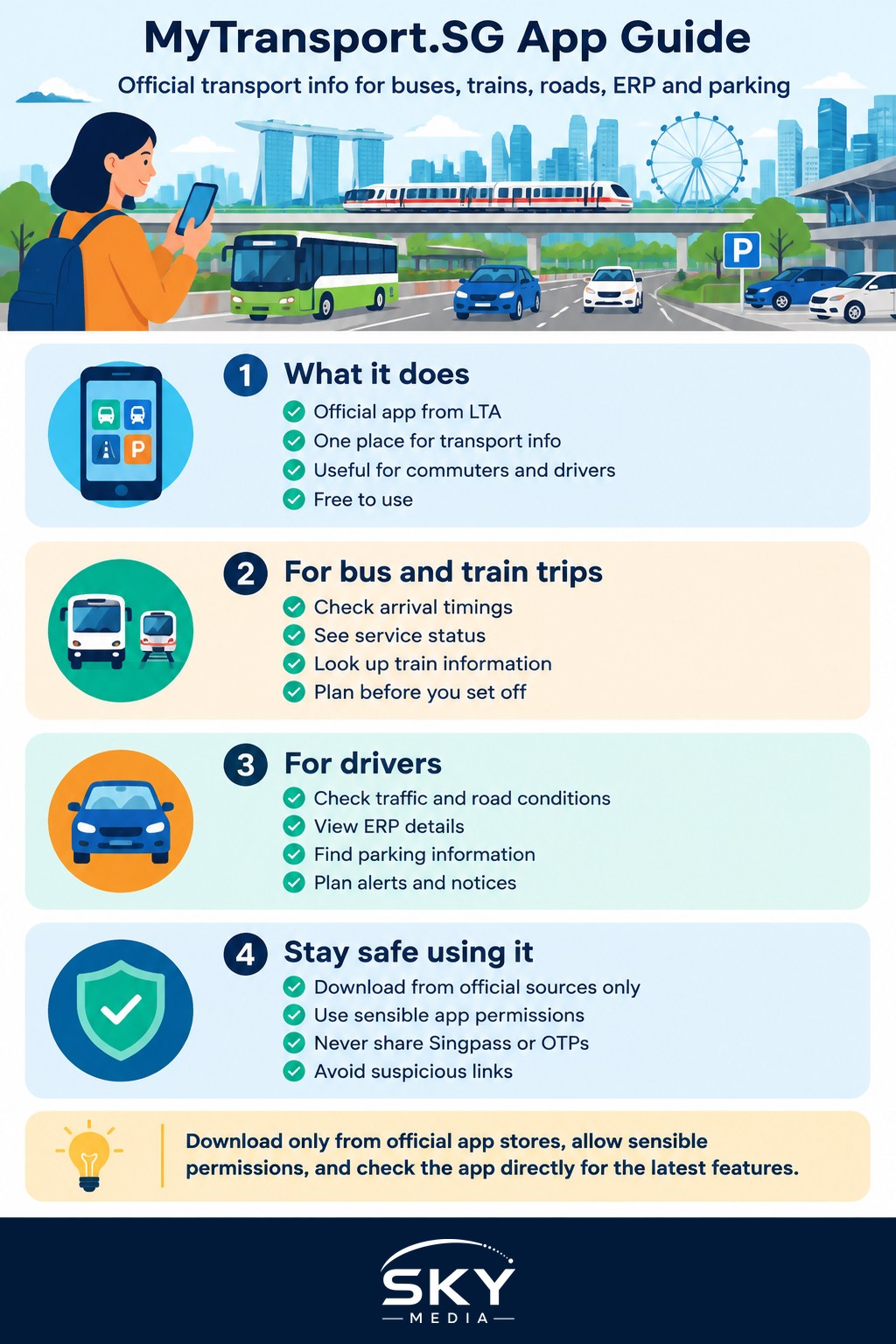
Think of MyTransport.SG as a single window into how the island is moving right now. Rather than juggling several tools, you can check public transport and road conditions from one official source. Broadly, it helps with two groups of people: those taking public transport, and those driving.
For public transport users, the app typically offers arrival information and service details, so you can see when the next bus is due or check on train services before you set off. For drivers, it leans into road conditions, traffic, and related information such as electronic road pricing and parking. The exact mix of features can change over time as the LTA updates the app, which is why it is best to open it and see the current menu rather than rely on any fixed list.
Because it is free and official, it is a sensible reference to have on your phone even if you also use other apps day to day.
Features commuters find useful
While the precise features evolve, these are the kinds of things the app is designed to help with. Treat this as a general picture and confirm what is live in the current version.
- Bus and train information. Check arrival timings and service status so you are not left guessing at the stop or station. Handy during our sudden downpours when you would rather wait indoors until the last minute.
- Traffic and road conditions. See how the roads are flowing before you drive, which helps you decide on a route or whether to leave earlier.
- ERP information. Look up electronic road pricing details so charges do not catch you by surprise.
- Parking information. Find details about car parks to help plan where to leave the car.
- Alerts and notices. Stay informed about disruptions or changes to services and roads.
For a fuller picture of getting around, the app works well alongside other tools. Our guides to transport apps for getting around and best parking apps cover complementary options that remain useful for turn-by-turn driving directions.
Getting started
Setting up is simple, and a careful start keeps you safe.
- Download from an official source only. Use your phone’s official app store and confirm the publisher is the Land Transport Authority before installing. Copycat apps that borrow official names do appear, so if anything looks wrong, stop and check the official LTA website. Our guide to spotting fake apps and malicious downloads lists the warning signs.
- Allow sensible permissions. The app may ask for location to show nearby stops or road conditions, which is reasonable. Grant only what fits the task, and review permissions if you are unsure.
- Explore the menu. Because features change, spend a minute tapping through the sections to see what the current version offers. Set up any alerts that suit your daily commute.
Staying safe while you use it
A transport app is a public information tool. It should never ask you to prove your identity through Singpass just to check a bus timing or traffic condition, and it will never need a one-time password to show you road information. Keep these habits:
- Protect your Singpass. Guard your Singpass login and never share it. A genuine transport information feature does not require it.
- Never share OTPs. Do not give your one-time passwords to anyone, including callers or messages claiming to help you with an app or a transport matter. Sharing an OTP can hand a scammer access to your accounts.
- Be wary of links. If you receive a message with a link about fares, fines, or transport, do not tap it in a rush. Go to the official app or website directly instead. Our guide to how to recognise phishing emails and SMS explains how these scams work.
- Keep the app updated. Updates fix problems and improve accuracy, so install them from the official store when they appear.
If you drive and safety is on your mind, remember to check the app before you set off, not while moving. Set your route or read conditions while parked, then keep your eyes on the road.
When to reach for it
MyTransport.SG shines when you want official, island-wide transport information in one place. Checking a bus before braving the rain. Glancing at traffic before a drive across town. Looking up ERP or parking before an unfamiliar trip. For turn-by-turn navigation you may still prefer a dedicated maps app, and for tapping onto buses and trains you will use your usual fare method. The strength here is trustworthy, official data about how the network is running.
The bottom line
The MyTransport.SG app gives Singapore commuters and drivers a single, official view of buses, trains, traffic, ERP, and parking, straight from the Land Transport Authority. Download it only from an official store, allow only sensible permissions, and lean on it for reliable transport information. Protect your Singpass, never share your OTPs, and ignore suspicious links about fares or fines. Because the app keeps changing for the better, open it now and then to see what is new, and always defer to the official app or site for the current steps.
Frequently Asked Questions
Can MyTransport.SG tell me if my bus is crowded? Features change over time, so open the current version of the app and look at the bus arrival details to see what information it offers. Do not count on crowd levels being shown. Check the official LTA site or the app’s help pages.
Is it safe to rely on the app for time-sensitive trips? It is a useful guide, but timings are estimates and disruptions can happen. Leave a buffer for important trips and have a backup route in mind. For service updates, also check announcements from your transport operator.
How do I check ERP charges before driving into town? The app has been designed to show ERP information, so look in its current menu for the relevant section. Rates and gantry timings can change, so confirm on the LTA website if you are unsure. Check before setting off, not while driving.
Does the app work for visitors and tourists? Visitors can use it for official bus, train and traffic information, provided they download it from a legitimate app store. They may still prefer a dedicated maps app for step-by-step walking directions. Check the app’s description for language options.
What should I do if I receive an SMS claiming to be from the app about a fine? Do not tap the link. Open the official app or the LTA website directly to check for any real notice. Never share your Singpass details or OTPs, and report suspicious messages through the official anti-scam channels.