
Not long ago, listening to music on a hi-fi meant spinning a disc or a record. Today, most of us listen from streaming services or our own digital files, and a whole category of gear has grown up to bring that music to a proper stereo system with the best possible quality. Network streamers and music servers are at the heart of that shift. If the terms sound confusing, do not worry. This guide explains what these devices are, how they differ, and how to decide whether you need one, all without the jargon. By the end you will know exactly where they fit in a modern setup.
What These Devices Actually Do
Let us untangle the two terms, because they are related but not the same.
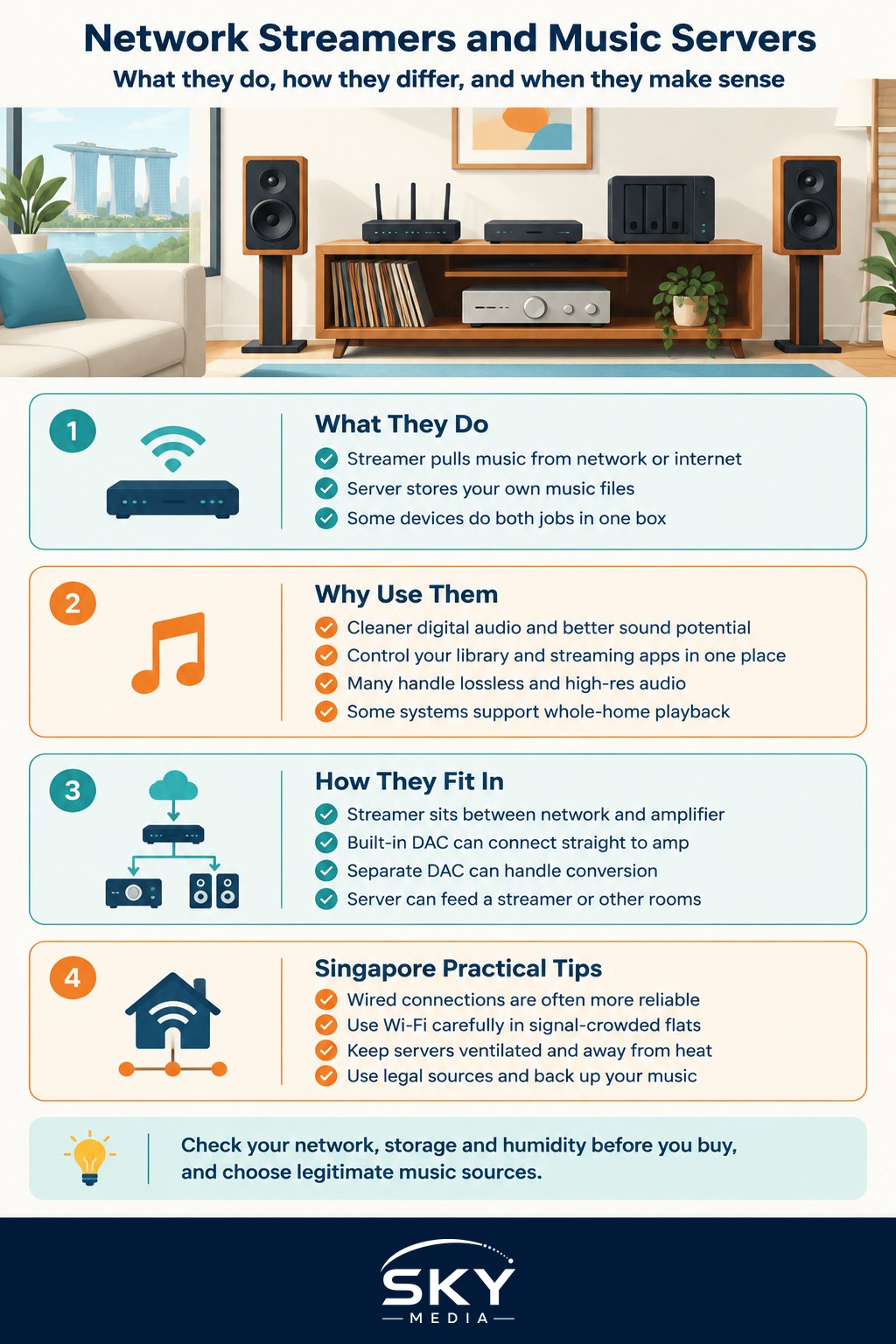
A network streamer is a device that pulls music from your home network or the internet and feeds it to your hi-fi. It connects to your Wi-Fi or wired network, accesses streaming services or files stored elsewhere in your home, and sends that audio to your amplifier or DAC. Think of it as a smart bridge between the digital world of streaming and your traditional stereo. You control it, usually, from an app on your phone or tablet.
A music server is a device that stores your own music files and serves them to your system or to other devices on the network. If you have ripped a CD collection or bought and downloaded music, a music server is where those files live and from where they are played. Some products combine both jobs, storing your files and streaming online services in one box.
There is overlap, and many modern units blur the line. The simple way to remember it: a streamer is mostly about accessing music, and a server is mostly about storing it. Because both deal in digital audio, it helps to understand audio file formats and quality so you know what you are actually storing and streaming.
Why People Use Them
You might reasonably ask why not just plug a phone or laptop into the hi-fi. You can, and it works. But dedicated network streamers and servers offer some real advantages for serious listening.
- Better sound potential. Purpose built devices are designed to handle digital audio cleanly, often with good quality conversion or a clean digital output to a separate DAC, aiming to reduce noise and errors.
- Convenience. A good app lets you browse your whole library and your streaming services in one place, from the sofa, without tying up your phone or computer.
- High quality formats. Many streamers handle high resolution and lossless audio properly, so you can enjoy better than CD quality where it is available.
- Multiroom options. Some ecosystems let you play music around the home in sync, which pairs naturally with the ideas in our guide to setting up wireless multiroom audio.
None of this is essential to enjoy music, so treat a streamer as an upgrade for convenience and quality, not a requirement.
How They Fit Into a System
A streamer usually sits between your network and your amplifier. If the streamer has a built in DAC, it can connect straight to an amplifier. If you prefer a separate DAC, the streamer sends a digital signal to it, and the DAC handles conversion before passing sound to the amp.
A music server sits on your network and holds your files. It might feed a streamer, play directly, or serve files to several rooms. If you are planning to store your own collection, think about backup, because a single drive can fail. Keeping a second copy of your ripped and purchased music is just sensible, and the same careful habits from our guide to backing up and organising your music projects apply to a music library too.
Practical Advice for Singapore
A few local realities are worth planning for.
- Network first. Streaming quality depends heavily on a stable network. A wired connection to your streamer, where practical, is more reliable than Wi-Fi, especially in an HDB flat with many competing signals. If you must use Wi-Fi, place your router sensibly and consider a mesh system for dead spots.
- Storage and heat. A music server with spinning hard drives generates a little heat and, like all electronics, dislikes our humidity. Keep it ventilated, not boxed in, and run it regularly.
- Humidity care. Streamers and servers are electronics like any other, so the routine in our guide to caring for your audio gear in the humidity applies. Good airflow and regular use keep moisture at bay.
- Licensing and sources. Stream from legitimate services and store music you have bought or ripped from your own discs. Respect copyright and use proper, legal sources.
Do You Actually Need One
Be honest about your habits before you spend. If you mostly stream casually, a phone or an all in one wireless speaker may be all you want. If you have a good stereo, care about sound quality, own a digital collection, or want elegant control of a large library, a network streamer or music server can be a genuine pleasure to use. As always, audition where you can, buy from reputable sellers, and check current models, features, and prices yourself, since this category changes fast.
Network streamers and music servers are simply the modern way to bring your music, wherever it lives, to a system you love. Understand the difference, sort out your network and backups, keep the gear dry, and you will have a setup that makes listening effortless for years to come.
Frequently Asked Questions
Can I just plug my laptop into my amplifier instead of buying a streamer? Yes, that works and is a fine way to start. A dedicated streamer adds convenience, app control and often cleaner handling of digital audio, but it is an upgrade, not a necessity. If you mostly stream casually, you may not need one.
Is Wi-Fi good enough for a network streamer, or should I use a cable? A wired connection is generally more reliable than Wi-Fi, especially in an HDB flat with many competing signals. If you must use Wi-Fi, place the router sensibly and consider a mesh system for dead spots.
How should I back up the music files on my server? A single drive can fail, so keep at least a second copy of your ripped and purchased music, ideally stored separately. Organise folders consistently, and check the backup occasionally. The habits for backing up music projects apply to a library too.
Do streamers play high-resolution or lossless music better than a phone? Many streamers are built to handle high-resolution and lossless audio properly, with clean conversion or a clean digital output to a separate DAC. A phone can play it too, but a dedicated device may do so with less noise. Availability depends on your service.
What is the difference between a streamer and a wireless multiroom speaker? A streamer feeds your existing hi-fi, so you choose your own amplifier and speakers, while a wireless multiroom speaker is an all-in-one unit. Multiroom systems can sync music around the home. A speaker may suit casual listeners; a streamer suits those with a good stereo.